Generated by ChatGPT:
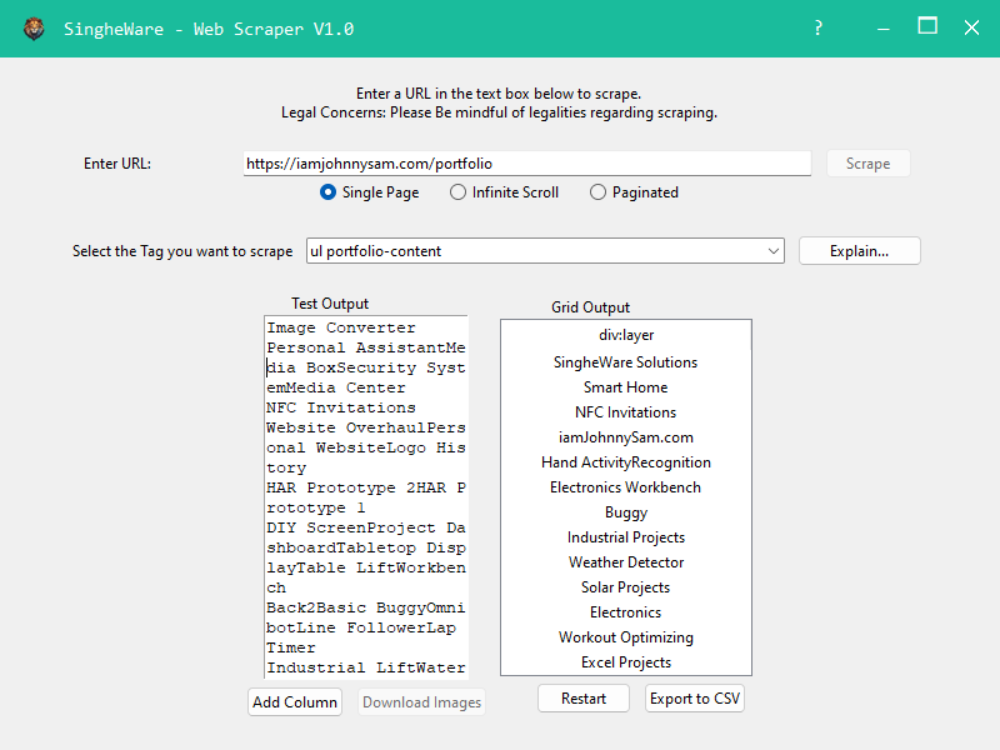
In this post, I’m excited to share a recent project I worked on—a custom web scraping application built using Python’s tkinter for the GUI, and BeautifulSoup for parsing and scraping data from websites. This tool allows you to extract content from multiple web pages, view and interact with tags, and export the data seamlessly.
Overview
This web scraper is designed to be user-friendly, offering a graphical interface that lets users input a URL, choose specific HTML elements and class names, and extract the content associated with those elements. The app has a modern, clean UI and includes several advanced features, such as validation for numeric inputs, dynamic content based on user actions, and the ability to export the results to CSV or download images.
Here are the key features and capabilities of this application:
Key Features
Intuitive GUI:
The application’s interface is built with tkinter, giving it a clean and responsive layout. It removes the traditional window title bar and replaces it with a sleek custom bar, including minimize and close buttons. The goal was to make the interface modern and easy to navigate for users who aren’t familiar with command-line tools.
Scraping Multiple Web Pages:
The application supports scraping data from multiple pages. Once the user inputs a URL, it scans the page and lists all the unique combinations of HTML tags and class names. The user can select any of these combinations from a drop-down menu and see a preview of the data found under that category.
Download Images:
When scraping pages containing images (<img> tags), the tool allows users to download those images directly to a local folder. It only downloads images if the <img> tag is selected in the dropdown, making it easy to manage large sets of images from websites.
Dynamic Interaction with Content:
- Dropdown Filter: The drop-down list for selecting tags and class names is searchable and filterable, making it easy to find the specific tag combinations you want to scrape.
- Message Box Explanation: If you’re unsure about what a specific tag or class means, there’s a button next to the dropdown that provides a detailed description of the selected HTML tag and class, helping users who are less familiar with HTML structures.
- Real-Time Validation: The URL input field has real-time validation. If you change the URL, it automatically triggers the scraper to reset the content, ensuring you're always working with fresh data.
Tag Assignment to Columns:
In the output view, there’s an option to assign the selected tag-class combinations to specific columns in a table. This allows users to organize the extracted data efficiently, especially when working with structured content, such as product listings, blog posts, or articles.
Data Export:
Once the data is scraped, you can easily export it to a CSV file. The data is processed without the need for heavy libraries like pandas, making the app lightweight. For image data, the app allows batch downloading of all selected images into a folder on your machine.