I have been trying to unify the media around my house for the better part of a decade. Not because anyone asked me to, but because the alternative — a USB drive plugged into one TV, a different drive in another room, downloads scattered across whichever machine happened to be on — offended the engineer in me. Every few years I rebuilt the system. Every rebuild taught me what the previous one got wrong.
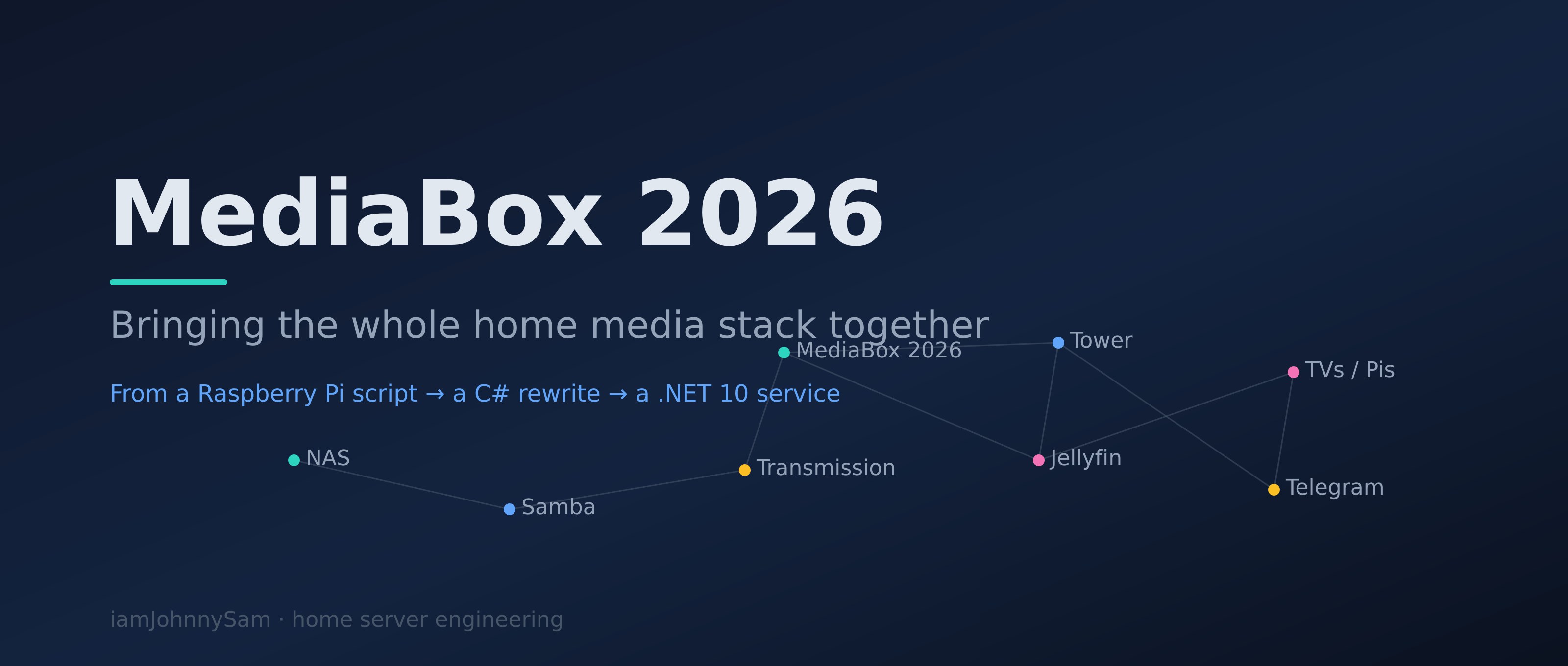
This post is the one that brings it all together. It traces the journey from a Python script on a Raspberry Pi to MediaBox 2026, a .NET 10 service, and — more importantly — describes the full home server stack that now hosts it. The individual pieces have their own posts. What was missing was the picture of how they all fit.
The Journey So Far
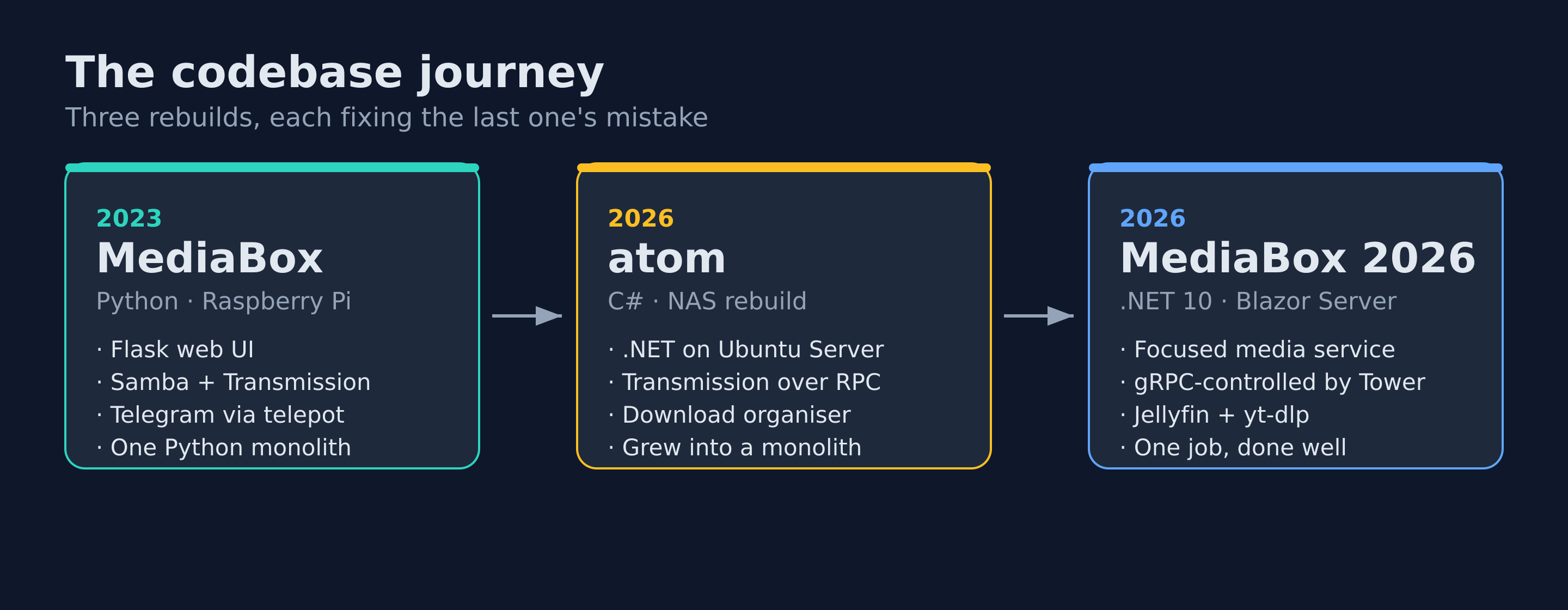
It is worth being honest about how long this took and how many wrong turns it involved, because the current system only makes sense as the sum of those mistakes.
The Raspberry Pi Media Box (Python)
The first real attempt was the DIY Raspberry Pi Media Box. A single Pi running Raspbian Lite, an NTFS USB drive mounted at /mnt/MediaBox, Samba sharing it to the LAN, Transmission for downloads, and a pile of Python — Flask for a small web UI, feedparser for RSS, telepot for a Telegram bot, even an IMAP routine that pulled CCTV stills out of my email. The whole thing lived in one repository: github.com/iamJohnnySam/MediaBox.
It worked, and I was proud of it. But it had three problems I could not engineer away. The Pi was underpowered — anything heavier than serving files made it struggle. The storage was a single NTFS drive with no room to grow cleanly. And the code was a Python monolith where the web server, the bot, the downloader, and the file organiser were all tangled into the same process. Adding a feature meant being careful not to break three others.
The Personal Assistant (the brain)
In parallel I had been building a Personal Assistant to automate my lifestyle. That is where the Telegram bot really grew up — from a thing that forwarded CCTV alerts into a genuine command interface that could answer questions, run tasks, and notify me when something needed attention. The assistant became the conversational front end for everything else. Today's MediaBox still talks to me through a direct descendant of that bot.
The NAS Rebuild — and the move to C#
The Pi could not keep being the centre of this. So I rebuilt the storage layer properly on a repurposed HP Compaq 8100 Elite — an old Core i5 desktop most people would have thrown out — running Ubuntu Server. Five hard drives became one logical pool with LVM (a volume group I named molecule, mounted at /molecule), Samba shared the media to every device on the LAN, and Transmission moved onto the same box. The machine itself I call Atom.
That rebuild was also when I gave up on Python for the automation layer and rewrote it in C#. The new engine lived under a broader project I called atom — one .NET solution that monitored Transmission over RPC, organised completed downloads into the right library folders, and talked to me over Telegram. At the end of the NAS post I promised I would share more about that automation engine. This is that follow-up.
Tower — the dashboard that ties it together
The last piece was visibility. With a NAS, a media engine, Jellyfin, a couple of Raspberry Pis as players, a Pi-hole, smart plugs, and a growing list of my own services, nothing was visible in one place. So I built Tower, a Blazor Server dashboard that pulls the whole setup into a single interface and — crucially for this story — became the scheduler and controller for MediaBox.
Why Rewrite MediaBox Yet Again
A fair question: if the C# version worked, why is there a MediaBox 2026 at all?
Because atom had quietly become a monolith — the same mistake the Python version made, just in a faster language. Media handling, smart-home control, server monitoring, and the website sync were all accreting into one codebase. When I built Tower, it made sense to pull the monitoring and orchestration concerns into it, and to split the media-specific logic back out into a focused service of its own. That service is MediaBox 2026: github.com/iamJohnnySam/MediaBox2026.
The split follows a clean rule. MediaBox is the executor; Tower is the scheduler. MediaBox knows how to scan a library, parse a filename, drive Transmission, and call Jellyfin. Tower decides when those things happen and gives me one screen to watch them. The two talk over gRPC. The lesson from two previous monoliths was that a service should do one thing well and expose a clean interface, rather than swallowing every adjacent responsibility because it happened to already be running.
The System That Hosts It
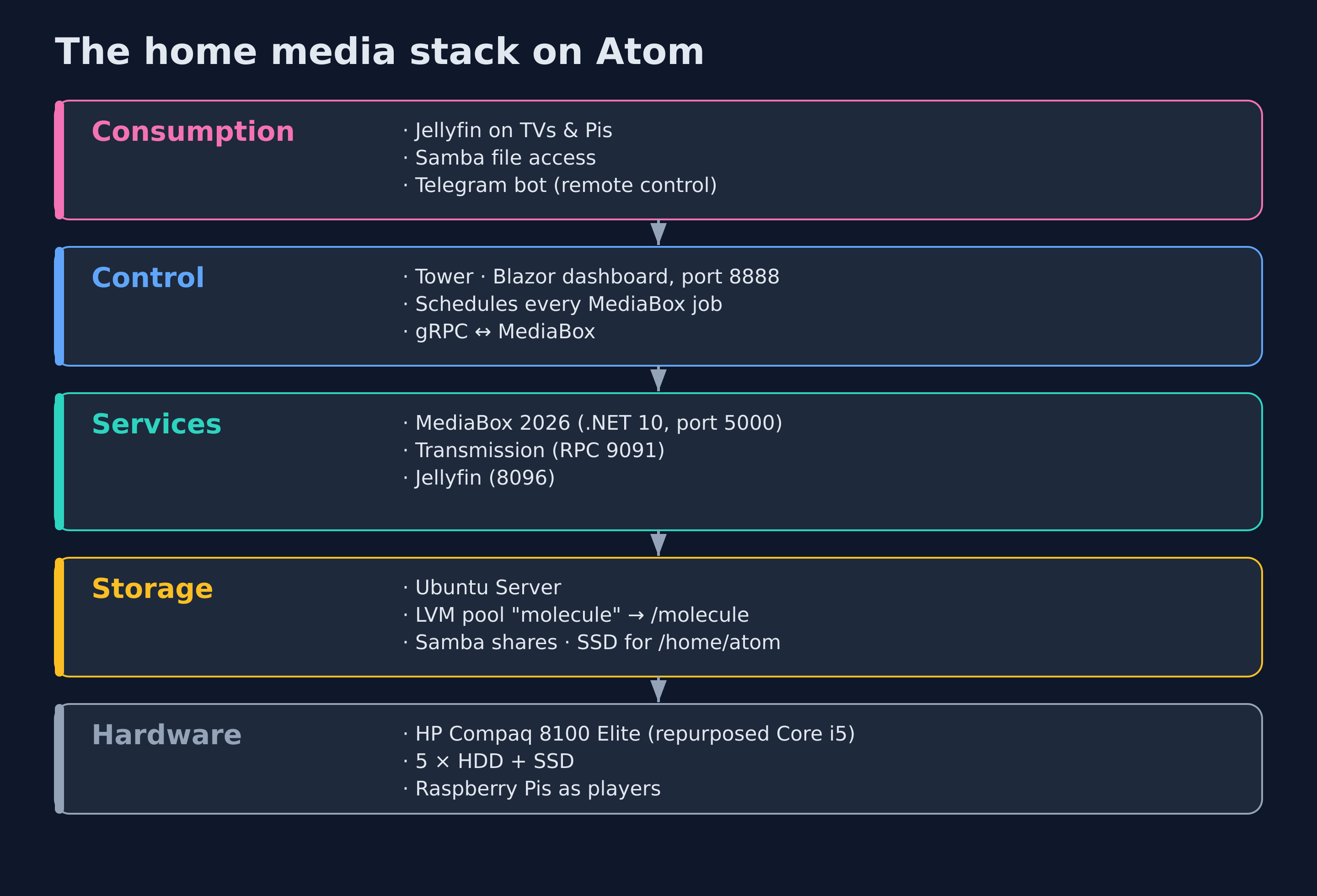
MediaBox 2026 does not run in isolation — it is one layer in a stack, and it only works because the layers under and over it are doing their jobs. Here is the whole thing.
Hardware and storage
At the bottom is Atom — the old HP Compaq — running Ubuntu Server. The five spinning disks are aggregated by LVM into the molecule volume group and mounted as a single tree at /molecule. An SSD holds /home/atom, where the application services live; that keeps the compute layer fast and the bulk storage cheap. Samba shares /molecule/Media to every TV, phone, and laptop in the house with no authentication friction. All of this is covered in detail in the NAS post.
The service layer
Three services sit on top of that storage and do the actual work:
- Transmission handles the torrent transfers, writing into
/molecule/Media/Downloads. It runs as thedebian-transmissionuser, which is why the NAS post spends so long on Linux group permissions — the daemon and MediaBox have to be able to hand files to each other cleanly. - MediaBox 2026 is the orchestration brain. It watches an RSS feed for new episodes, maintains a movie watchlist, tells Transmission what to fetch, then organises completed downloads into the right library folders.
- Jellyfin serves the finished library to the TVs and to the Raspberry Pis acting as players. When MediaBox files a new download into the library, it calls Jellyfin's API to trigger a rescan so the new content appears without me touching anything.
The control layer
Above the services sits Tower, on port 8888. It schedules every MediaBox background job — RSS checks every 30 minutes, download organising every 10 minutes, Transmission polling every 5 minutes, a full library scan every 12 hours, YouTube checks every hour — and exposes MediaBox's downloads, library, watchlist, and settings in the browser. MediaBox also serves its own Blazor UI directly on port 5000 for when I want to go straight to it, and it runs as a systemd unit so it comes back on its own after a reboot or a power cut:
[Unit]
Description=MediaBox 2026
After=network.target

[Service]
WorkingDirectory=/home/atom/MediaBox2026
ExecStart=/home/atom/MediaBox2026/MediaBox2026
Restart=always
User=atom

[Install]
WantedBy=multi-user.target
The consumption layer
At the top is everything I actually interact with: Jellyfin on the TVs and Pis for watching, Samba for grabbing a file directly, and the Telegram bot — the same lineage that started with the Personal Assistant — as the remote control that lives in my pocket.
How a Show Actually Gets to the TV
The clearest way to explain the system is to follow one episode from "it aired" to "it is playing in the living room." None of the steps need me.
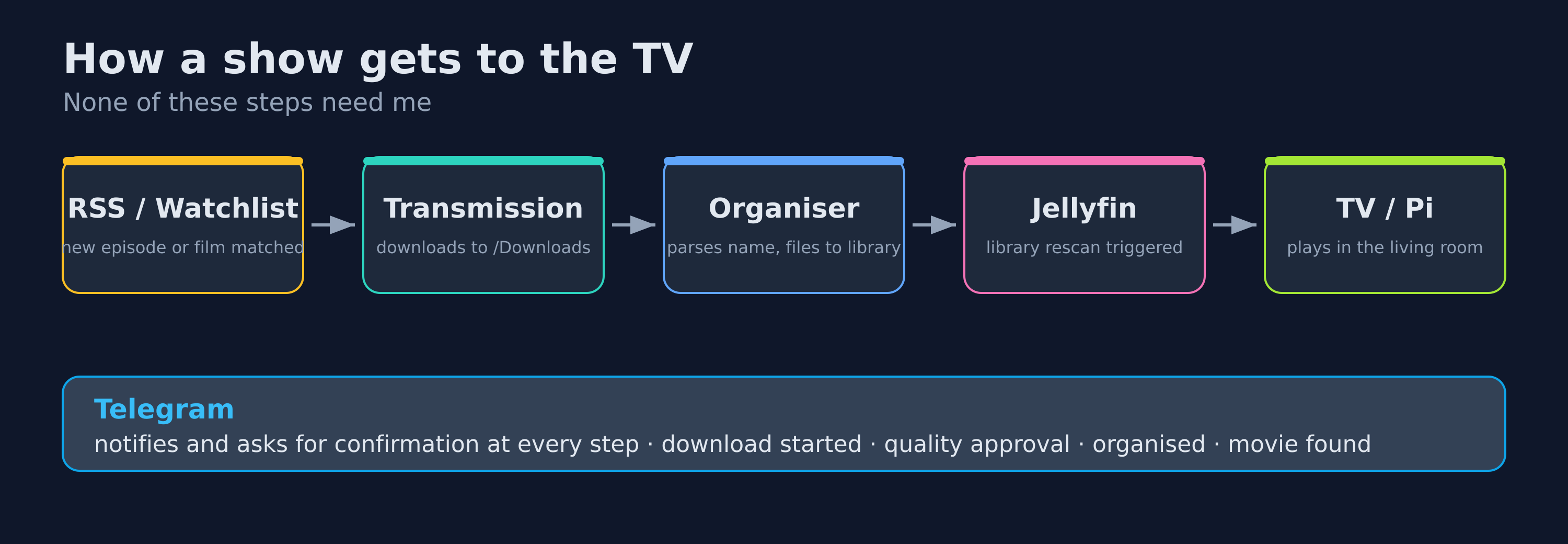
- The RSS monitor sees a new episode of a show I track and hands the torrent to Transmission. If only a lower quality is available, MediaBox waits a configurable number of hours for something better, then asks me over Telegram whether to take the lower quality anyway — with inline Yes / No buttons.
- Transmission downloads into
/molecule/Media/Downloads. The Transmission monitor reports progress, which I can watch from Tower or ask the bot about with/downloads. - When the transfer completes, the download organiser parses the filename, works out the show and season, and moves the file into
/molecule/Media/TVShows/<Show>/Season XX/. A Telegram message confirms it:Organized: <file> -> <show>/Season XX/. - MediaBox calls the Jellyfin API to refresh the library. The episode appears on every Jellyfin client in the house.
- I watch it on the TV — direct-played if the format allows, which Tower's Jellyfin page lets me confirm so I am not silently burning CPU on transcoding.
The movie path is the same shape, fed by the watchlist instead of RSS. I add a film with /add Inception 2010, MediaBox checks the YTS API periodically, and when the film becomes available at an acceptable quality it pings me to confirm the download before it starts.
What MediaBox 2026 Actually Does
Stripped of the history, this is the concrete feature set of the new service:
- Media catalog — scans the TV, movie, and YouTube library paths and indexes what is there.
- RSS episode monitor — watches a feed for new episodes of tracked shows and queues them, with a quality-wait-and-confirm step.
- Transmission integration — adds torrents and monitors progress over the RPC API.
- Download organiser — parses completed filenames and moves them into the correct library folders.
- Movie watchlist — searches the YTS API, with an interactive Telegram browser showing poster, rating, genres, trailer, and available qualities before adding.
- YouTube archiver — schedules
yt-dlpdownloads of channels I follow, with an archive file so nothing is fetched twice. - Jellyfin refresh — triggers a library rescan whenever new content lands.
- Telegram bot —
/status,/downloads,/watchlist,/movie,/add,/scanand more, plus push notifications for every meaningful event. - Crash reporter — captures unhandled exceptions, saves the crash data, and alerts me before I notice anything is wrong.
The paths it manages all hang off the same pool:
"MediaBox": {
  "TvShowsPath":   "/molecule/Media/TVShows",
  "MoviesPath":    "/molecule/Media/Movies",
  "DownloadsPath": "/molecule/Media/Downloads",
  "YouTubePath":   "/molecule/Media/YouTube",
  "JellyfinUrl":   "http://localhost:8096",
  "TransmissionRpcUrl": "http://localhost:9091/transmission/rpc"
}
Under the Hood
A feature list is easy to write and tells you almost nothing. The interesting part of MediaBox 2026 is the handful of small problems that turned out to be genuinely fiddly, and the code that solves them. Here are the ones I am happiest with.
Making sense of release names
The single most underestimated problem in home media automation is that nobody names files sanely. The same episode shows up as The.Show.S02E07.1080p.WEB-DL.x265-RARBG, The Show - 2x07 [720p], or The_Show_Season_2_Episode_7_HDTV. Before MediaBox can file anything it has to turn that chaos into a clean show name, a season, and an episode. It does this with a cascade of regular expressions, tried in order until one sticks:
// Real releases use all of these shapes, so try each in turn
Regex[] patterns =
[
    SeasonEpisodeRegex1(), // S01E01
    SeasonEpisodeRegex2(), // S01 E01
    SeasonEpisodeRegex3(), // S01x01
    SeasonEpisodeRegex4(), // 01x01
    SeasonEpisodeRegex5(), // 1x01
    SeasonEpisodeRegex6(), // Season 1 Episode 1
];

foreach (var pattern in patterns)
{
    var match = pattern.Match(baseName);
    if (match.Success && match.Groups.Count >= 3)
    {
        info.Season  = int.Parse(match.Groups[1].Value);
        info.Episode = int.Parse(match.Groups[2].Value);
        baseName = baseName[..match.Index]; // everything before SxxExx is the title
        break;
    }
}
The title itself is whatever sits to the left of the first thing it recognises. For movies the trick is the release year: torrent names almost always follow Title.Year.Quality.Codec.Source-Group, so once a four-digit year is found, everything from there onward is technical noise and can be cut:
// Title.Year.Quality.Codec.Source-Group — truncate at the year
var yearMatch = YearRegex().Match(" " + baseName + " ");
if (yearMatch.Success)
{
    info.Year = int.Parse(yearMatch.Groups[1].Value);
    baseName = baseName[..(yearMatch.Index - 1)];
}
What is left is run through a list of junk tokens to strip — BLURAY, x265, YIFY, RARBG, tracker URLs and the rest — then title-cased into something I would actually recognise. There is also a small token-overlap fuzzy match used elsewhere, so Spiderman and Spider Man resolve to the same library folder instead of creating two. None of this is glamorous, but it is the difference between a library that organises itself and one I have to babysit.
Waiting for the right quality instead of grabbing the first hit
My home connection is not generous and storage on the NAS is finite, so my default preference is a smaller file — anything at 720p or below downloads immediately. Anything larger does not get grabbed on sight. Instead the episode is parked in a WaitingForQuality state, and MediaBox holds off for a configurable number of hours to see whether a smaller release of the same episode turns up first:
var quality = FileNameParser.DetectQuality(title);

if (FileNameParser.IsQualityAcceptable(quality))   // 720p or below
{
    await transmission.AddTorrentAsync(torrentUrl, ct);
    // Record the episode so other release groups for it are ignored
    db.DispatchedEpisodes.Insert(new DispatchedEpisode { /* show, season, episode */ });
}
else
{
    // Too big right now — park it and wait QualityWaitHours for something smaller
    db.PendingDownloads.Insert(new PendingDownload
    {
        ShowName = parsed.CleanName,
        Season   = parsed.Season!.Value,
        Episode  = parsed.Episode!.Value,
        Quality  = quality,
        Status   = PendingStatus.WaitingForQuality,
        RssPublishDate = pubDate ?? DateTime.UtcNow
    });
}
If the wait window passes and nothing smaller has appeared, MediaBox stops being clever and asks me: a Telegram message saying only a higher quality is available, with inline Yes / No buttons. The DispatchedEpisodes table does the other half of the job — an RSS feed lists the same episode from a dozen release groups, and that table is the dedup key that stops me downloading the same thing five times.
The Transmission handshake nobody warns you about
Talking to Transmission over its RPC API has one quirk that trips up everyone the first time. The very first request always comes back as 409 Conflict with a session-id in a header. You are expected to read that header, attach it, and replay the request. So the RPC client does exactly that, transparently, and caches the id for every call after:
var response = await http.PostAsync(config.TransmissionRpcUrl, content, ct);

// Transmission answers the first call with 409 + a session-id header.
// Capture it, attach it, and replay the request once.
if (response.StatusCode == HttpStatusCode.Conflict)
{
    if (response.Headers.TryGetValues("X-Transmission-Session-Id", out var values))
    {
        _sessionId = values.FirstOrDefault();
        if (retry) return await SendRpcAsync(request, ct, retry: false);
    }
}
One Jellyfin scan, not fifty
When a full season finishes, the download organiser files a dozen episodes into the library inside the same minute. Naively calling Jellyfin's refresh endpoint per file would have it scanning constantly. So the Jellyfin client is guarded two ways — a ten-minute cooldown, and a single-flight lock so overlapping calls collapse into one:
if (_lastScanTriggeredAt is { } last && DateTime.UtcNow - last < ScanCooldown)
    return; // still inside the 10-minute cooldown

if (Interlocked.CompareExchange(ref _scanInProgress, 1, 0) != 0)
    return; // a scan is already running — let it finish
The actual refresh call is wrapped in an exponential-backoff retry as well, because Jellyfin restarting at the wrong moment should not mean a freshly downloaded episode silently never appears.
Archiving YouTube channels without re-downloading the internet
MediaBox keeps local copies of a few YouTube channels I follow. The whole feature leans on one yt-dlp flag — --download-archive — which records the id of every video it has ever fetched. Re-running the job is therefore idempotent: it only ever pulls genuinely new uploads, never the back catalogue again.
yt-dlp
  --download-archive /home/atom/.config/ytdl-archive.txt
  --no-overwrites
  --dateafter today-3days
  --playlist-end 20
  --match-title "<channel filter>"
  -o "/molecule/Media/YouTube/%(uploader)s/%(upload_date)s - %(title)s.%(ext)s"
  -f "best[height<=720]"
  <channel url>
MediaBox shells out to yt-dlp as a child process, captures its output, and enforces a timeout so a stuck download can never wedge the scheduler. The --dateafter and --playlist-end bounds keep each run cheap — it is looking at recent uploads, not re-walking an entire channel.
The whole Tower split, in one file
The cleanest thing in the project is also the smallest. The entire contract between Tower and MediaBox is a single gRPC .proto file, and it makes the scheduler-versus-executor division explicit. The triggers are verbs that run one unit of work and return; MediaBox no longer owns a single timer of its own, because Tower owns the schedule:
service MediaBoxControl {
  // Triggers — Tower calls these on its schedule; MediaBox just executes
  rpc Scan(Empty)             returns (RunResult);
  rpc Organize(Empty)         returns (RunResult);
  rpc RssCheck(Empty)         returns (RunResult);
  rpc TransmissionPoll(Empty) returns (RunResult);
  rpc YouTubeDownload(Empty)  returns (RunResult);
  rpc WatchlistCheck(Empty)   returns (RunResult);

  // Queries — Tower reads MediaBox state for the dashboard
  rpc GetStatus(Empty)        returns (Status);
  rpc GetDownloads(Empty)     returns (DownloadList);
  rpc GetLibrary(LibraryQuery) returns (MediaList);

  // Mutations — actions taken from the Tower UI
  rpc AddWatchlist(TitleArg)       returns (RunResult);
  rpc SearchAndAddMovie(TitleArg)  returns (RunResult);
  rpc UpdateSettings(SettingsMap)  returns (RunResult);
}
Grouping the calls into triggers, queries, and mutations is not decoration — it is the architecture written down. A trigger is something Tower's scheduler fires. A query is something the dashboard reads. A mutation is something I do from the UI. When the boundary between two services is this legible, neither one has any excuse to start absorbing the other's responsibilities, which is exactly the failure mode that killed the two previous versions.
What's Next
The system does what I set out to build a decade ago: media arrives, sorts itself, and is watchable in any room without me managing files. That goal is genuinely met. But there is a roadmap, and I would rather name it than end on "will keep you updated."
The next things I want are subtitle auto-download (Bazarr or OpenSubtitles), metadata enrichment so the Blazor dashboard shows posters and ratings from TMDb instead of bare folder names, and a Docker packaging so the whole stack is one command to stand up on new hardware. Further out, I would like the Telegram bot to take natural-language requests — "download the latest episode of X" — instead of strict command syntax, which is a natural fit for the kind of assistant this all grew out of.
If there is one lesson across the whole journey, it is the one that finally produced a system I am happy with: build focused services with clean interfaces, let one tool schedule and one tool execute, and resist the gravity that pulls every running process toward becoming a monolith. Three rebuilds in, that is the part I would tell my Raspberry-Pi-era self.