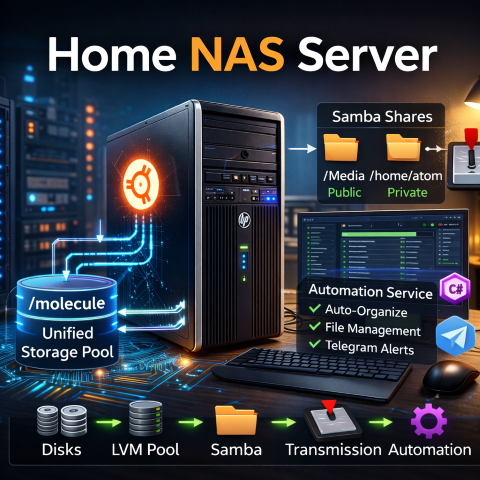
For years, my home storage setup was functional — but architecturally messy. You can check this out here -> iamJohnnySam | Media Box
Each hard drive was mounted independently, and each disk had its own Samba share. It worked, but it wasn’t scalable, resilient, or clean from a systems perspective. As someone working in systems engineering and automation, that bothered me. The system functioned, but it wasn’t designed.
This post walks through how I migrated from independent HDD shares to a structured LVM-based storage pool on Ubuntu Server, integrated Samba, Transmission, and a custom C# automation layer — all running on repurposed hardware that most people would have retired.
Phase 1 — The Original Setup (The “It Works” Stage)
Initially, I had:
- Multiple 1TB HDDs
- Ubuntu Server
- Individual mount points
- Separate Samba shares per drive
Each had its own Samba block in smb.conf.
Problems With This Architecture
- No unified storage abstraction
- Manual allocation of data per disk
- Uneven disk utilization
- Difficult future expansion
- No clean way to re-balance data
It was storage at the filesystem level, not at the volume-management level. Every time a disk filled up, I had to manually decide where new data should go. There was no logical aggregation layer between physical disks and network access.
Phase 2 — The Goal: A Single Logical Pool
What I wanted:
- One logical storage pool
- Single mount point
- Clean folder hierarchy
- Proper permission model
- Easy future expansion
- Ability to automate file orchestration
Naturally, I evaluated ZFS and TrueNAS.
Why Not TrueNAS?
I attempted installing TrueNAS (CORE and SCALE), but the older hardware presented compatibility and installation issues.
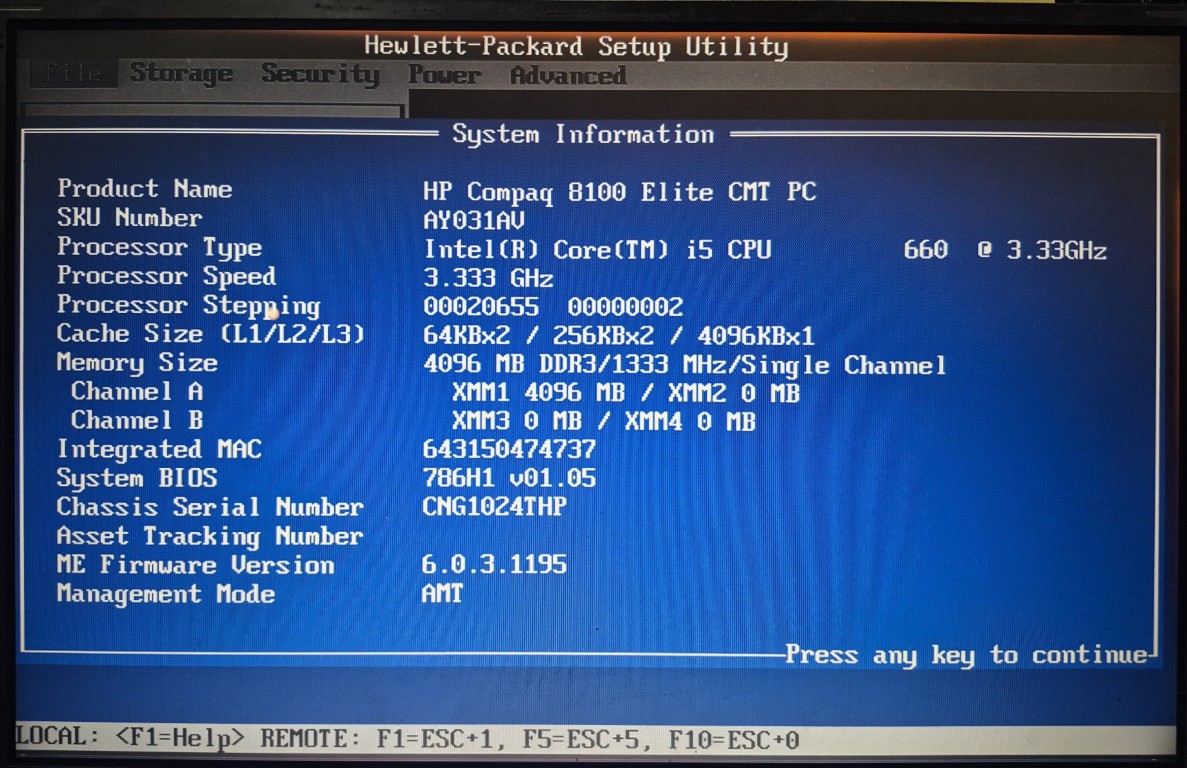
I am running a very old HP Compaq 8100 Elite PC with an early-generation Intel Core i5 processor. This machine has served reliably for years, but it was never designed for modern storage-heavy operating systems.
Instead of fighting the hardware, I stepped back and reconsidered:
Do I actually need full ZFS-level enterprise features for a home NAS?
For my use case — media storage, automation workflows, and torrent orchestration — the honest answer was no.
Why I Settled on LVM
While reinstalling Ubuntu Server, I revisited Logical Volume Manager (LVM). LVM provides a clean abstraction layer between physical disks and filesystems without imposing heavy system requirements.
LVM gave me:
- A unified volume group
- Logical abstraction over physical disks
- Expandability (add disks later)
- Snapshot capability
- Simplicity
- Native Linux integration
And most importantly — it worked immediately on my hardware with zero compatibility friction.
Current Storage Architecture
Physical disks → Volume Group → Logical Volume → Single mount
/dev/sda
/dev/sdb
/dev/sdc
/dev/sdd
/dev/sde
↓
Volume Group: molecule
↓
Logical Volume: media
↓
Mounted at: /molecule
This transformed five independent disks into one logical storage pool.
Samba Configuration
I structured Samba into two logical shares to reflect system architecture rather than just folders.
Public Media Share (Open Access)
[Media]
    path = /molecule/Media
    writeable = Yes
    create mask = 0777
    directory mask = 0777
    public = Yes
Purpose:
- Accessible by all LAN devices
- Centralized media repository
- No authentication friction for TVs, tablets, and laptops
Private SSD Application Share
[atom]
    path = /home/atom
    browseable = yes
    read only = no
    valid users = user
    create mask = 0775
    directory mask = 0775
Purpose:
- Lives on SSD for performance
- Hosts my custom C# automation service
- Restricted access
- Cleaner permission control
This separation enforces architectural intent:
- HDD pool = Storage layer
- SSD = Compute and orchestration layer
The system is now layered instead of improvised.
Transmission Integration
Transmission is configured with:
'download-dir': '/molecule/Media/Downloads',
'incomplete-dir': '/molecule/Media/IncompleteDownloads'
Key detail:
Transmission runs as debian-transmission, not my primary user account. That means Linux permissions must be intentionally structured.
I created a shared group and applied proper ownership:
groupadd media
usermod -aG media debian-transmission
usermod -aG media user
chown -R root:media /molecule/Media
chmod -R 2775 /molecule/Media
This ensures:
- Transmission can write
- Samba users can write
- New files inherit correct group
- No permission deadlocks
This is critical in multi-service Linux storage systems where daemons and users interact on the same filesystem.
Custom C# Automation Layer (Atom → MediaBox)
This is where the system becomes more than just a NAS.
On the SSD share (/home/atom), I deployed a background C# service that:
- Monitors Transmission via RPC
- Organizes downloaded content
- Moves files into structured directories
- Deletes torrents post-processing
- Interfaces with me via Telegram
- Maintains folder taxonomy rules
This module started life under the broader Atom project as the MediaBox engine, and has since become a dedicated .NET 10 service. I cover the full journey and the system that hosts it here -> iamJohnnySam | MediaBox 2026.
This effectively acts as a lightweight orchestration engine for home media lifecycle management. It separates raw ingestion (torrent downloads) from structured storage, keeping the media library clean and deterministic.
Why Not ZFS?
ZFS is powerful and feature-rich:
- End-to-end checksumming
- Self-healing data
- RAID-Z configurations
- Snapshots
- Compression
But for this hardware and workload:
- LVM is lighter
- Easier to recover on standard Linux installs
- No significant RAM overhead
- No kernel compatibility concerns
If I upgrade to newer hardware with ECC memory and higher RAM capacity, I may migrate to ZFS. For now, LVM provides the correct abstraction-to-complexity ratio.
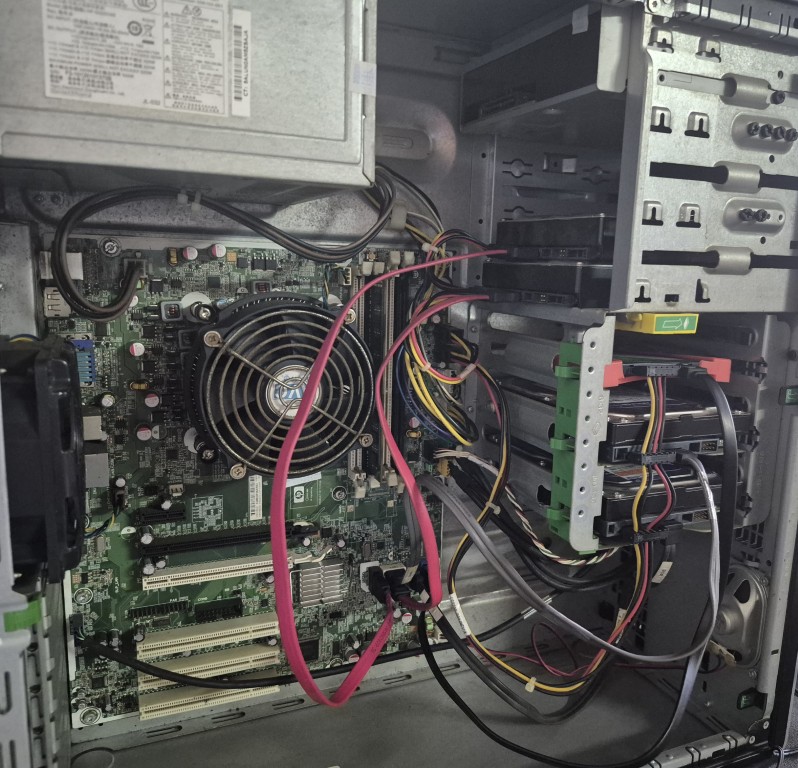
This NAS is not enterprise-grade. It is not redundant RAID with hot spares and ECC memory. But it is structured, expandable, automated, and intentionally engineered.
And that makes all the difference.
sudo apt update
sudo apt upgrade
sudo apt update

# Sudo permissions
sudo usermod -aG sudo atom

# Wipe Drives
sudo wipefs -a /dev/sdb
sudo wipefs -a /dev/sdc
sudo wipefs -a /dev/sdd
sudo wipefs -a /dev/sde

# Create physical volume
sudo pvcreate /dev/sdb
sudo pvcreate /dev/sdc
sudo pvcreate /dev/sdd
sudo pvcreate /dev/sde

# Create logical volume
sudo vgcreate molecule /dev/sdb /dev/sdc /dev/sdd /dev/sde
sudo lvcreate -l 100%FREE -n media molecule

# Format
sudo mkfs.ext4 /dev/molecule/media

# Create mount point and mount
sudo mkdir /molecule
sudo mount /dev/molecule/media /molecule

# Make the mounting permanent
sudo blkid
sudo nano /etc/fstab
→ UUID=6b3b1323-87fb-4842-8e67-7e75737a8c2b  /molecule  ext4  defaults,noatime  0  2

sudo tune2fs -m 0 /dev/molecule/media

# Set Static IP
ls /etc/netplan/
sudo nano /etc/netplan/01-netcfg.yaml

→ # This is the network config written by 'subiquity'
network:
  version: 2
  ethe
ets:
    enp0s25:
      dhcp4: no
      addresses:
        - 192.168.1.30/24
      routes:
        - to: default
          via: 192.168.1.1
      nameservers:
        addresses: [1.1.1.1]

# Samba Set up
sudo apt install samba
sudo systemctl status smbd

sudo adduser user
sudo usermod -aG molecule user

sudo nano /etc/samba/smb.conf

→ [Media]
   path = /molecule/Media
   writeable=Yes
   create mask=0777
   directory mask=0777
   public=Yes

→ [atom]
    path = /home/atom
    browseable = yes
    read only = no
    valid users = user
    create mask = 0775
    directory mask = 0775

sudo smbpasswd -a user

→ .NET
sudo curl -sSL https://dot.net/v1/dotnet-install.sh | bash /dev/stdin --channel STS

sudo apt-get update &&
  sudo apt-get install -y dotnet-sdk-9.0

sudo apt-get update &&
  sudo apt-get install -y aspnetcore-runtime-10.0

sudo apt update
sudo apt install dotnet-runtime-8.0

echo 'export DOTNET_ROOT=$HOME/.dotnet' >> ~/.bashrc
echo 'export PATH=$PATH:$HOME/.dotnet' >> ~/.bashrc
source ~/.bashrc

dotnet --version

→ Transmission
sudo chmod -R 775 /molecule/Media
sudo apt install transmission-daemon

sudo systemctl stop transmission-daemon

sudo chown -R debian-transmission:debian-transmission /molecule/Media/Downloads
sudo chown -R debian-transmission:debian-transmission /molecule/Media/IncompleteDownloads

/etc/transmission-daemon/settings.json

→ {
  'alt-speed-down': 0,
  'alt-speed-enabled': false,
  'alt-speed-time-begin': 465,
  'alt-speed-time-day': 127,
  'alt-speed-time-enabled': true,
  'alt-speed-time-end': 15,
  'alt-speed-up': 0,
  'bind-address-ipv4': '0.0.0.0',
  'bind-address-ipv6': '::',
  'blocklist-enabled': false,
  'blocklist-url': 'http://www.example.com/blocklist',
  'cache-size-mb': 4,
  'dht-enabled': true,
  'download-dir': '/molecule/Media/Downloads',
  'download-limit': 100,
  'download-limit-enabled': 0,
  'download-queue-enabled': true,
  'download-queue-size': 5,
  'encryption': 1,
  'idle-seeding-limit': 30,
  'idle-seeding-limit-enabled': false,
  'incomplete-dir': '/molecule/Media/IncompleteDownloads',
  'incomplete-dir-enabled': true,
  'lpd-enabled': false,
  'max-peers-global': 200,
  'message-level': 1,
  'peer-congestion-algorithm': '',
  'peer-id-ttl-hours': 6,
  'peer-limit-global': 200,
  'peer-limit-per-torrent': 50,
  'peer-port': 51413,
  'peer-port-random-high': 65535,
  'peer-port-random-low': 49152,
  'peer-port-random-on-start': false,
  'peer-socket-tos': 'default',
  'pex-enabled': true,
  'port-forwarding-enabled': false,
  'preallocation': 1,
  'prefetch-enabled': true,
  'queue-stalled-enabled': true,
  'queue-stalled-minutes': 30,
  'ratio-limit': 0,
  'ratio-limit-enabled': true,
  'rename-partial-files': true,
  'rpc-authentication-required': false,
  'rpc-bind-address': '0.0.0.0',
  'rpc-enabled': true,
  'rpc-host-whitelist': '192.168.1.*',
  'rpc-host-whitelist-enabled': true,
  'rpc-password': '{828b6db2a9fc2115177ab572cce421d5d89d5e74UtkMgp.E',
  'rpc-port': 9091,
  'rpc-url': '/transmission/',
  'rpc-use
ame': 'transmission',
  'rpc-whitelist': '127.0.0.1, 192.168.1.*',
  'rpc-whitelist-enabled': true,
  'scrape-paused-torrents-enabled': true,
  'script-torrent-done-enabled': false,
  'script-torrent-done-filename': '',
  'seed-queue-enabled': false,
  'seed-queue-size': 10,
  'speed-limit-down': 100,
  'speed-limit-down-enabled': false,
  'speed-limit-up': 100,
  'speed-limit-up-enabled': false,
  'start-added-torrents': true,
  'trash-original-torrent-files': false,
  'umask': 2,
  'upload-limit': 100,
  'upload-limit-enabled': 0,
  'upload-slots-per-torrent': 14,
  'utp-enabled': true
}
Setting up YouTube downloads
sudo apt update
sudo apt install -y python3 python3-pip ffmpeg

pip install -U yt-dlp
pip install ytdl-sub

mkdir -p /molecule/Media/YouTube

configuration:
  working_directory: /home/atom/.cache/ytdl-sub

yt-dlp \
  --download-archive /home/atom/.config/ytdl-archive.txt \
  --no-overwrites \
  -o '/molecule/Media/YouTube/%(uploader)s/%(upload_date)s - %(title)s.%(ext)s' \
  -f 'best[height<=720]' \
  https://www.youtube.com/@BlokandDino