The last Tower post was about email. Tower had learned to read my inbox and turn twelve years of bills, bank statements and solar reports into data. I ended it by saying I opened the dashboard less than I did in June, and that this was the point.
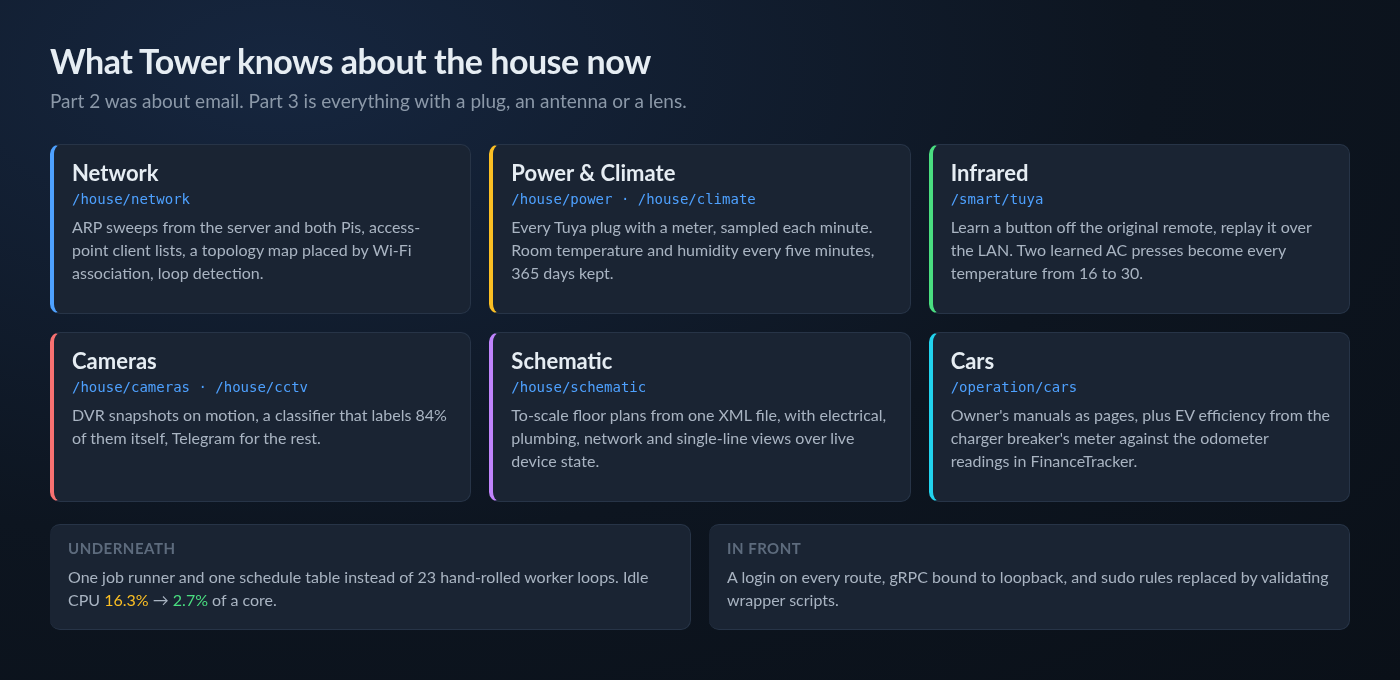
That stayed true for about a week. Then I started pointing Tower at things that are not in an inbox: the Wi-Fi, the air conditioners, the plugs, the cameras, the cars, and eventually the walls of the house itself. Two months and 231 commits later, Tower knows a lot more about the building it runs in than it does about my email. This post is about that, and about the handful of times the house knew better than my code did.
There is also a housekeeping change. Tower, MediaBox 2026 and everything else that runs on the server now sit under their own project on this site, named after the machine they all live on: Atom. That page is now the overview of everything the box does. It is a 2010-era Core i5 box, and it has earned a page of its own.
The Network Took Me Off the Network
This section starts with an outage, because that is where it actually started.
I had built a LAN scanner in August. It ARP-sweeps the subnet from the server, merges in sweeps from the two Raspberry Pis so that devices in other rooms are seen from a closer vantage point, identifies Tuya devices by their MAC vendor and mDNS names, and sends a Telegram alert when something unknown joins. Phones with randomised MAC addresses were generating an alert every time they reconnected, so those are now batched into a single daily digest instead.
Then, on 15 September, the server dropped off the network. Not the internet — the LAN. The odd thing was that the device causing it was nowhere near the server's path to the router.
It was a layer-2 loop. The TP-Link range extender in the living room had ended up bridging Wi-Fi back onto the wired LAN, so the Huawei router appeared as a client of the extender. Every broadcast went round in a circle and flooded the whole segment. One MAC address was answering ARP for five different IP addresses at once.
What annoyed me was that Tower had been collecting most of the evidence and had no idea what it was looking at. So it now checks for three cheap signals every five minutes, none of which needs a login anywhere:
- Duplicate ping replies — the same frame arriving twice by two paths.
- Carrier flaps between ticks — the extender's loop protection cycling the port.
- One MAC answering ARP for three or more addresses.
The alert is edge-triggered: one Telegram message when the signature appears and one when it clears. Sending lan to the bot runs the same check on demand.
There was one trap in writing it. The MAC address that held five IPs during the outage had its locally-administered bit set — it looks exactly like a phone's randomised MAC. My first instinct was to filter randomised MACs out of the check, because they are noisy. That would have blinded it to the exact fault it was built for. There is a regression test for that now.
Drawing the Network Wrong, Then Right
With the access points under Tower's eye I wanted a topology map: which device hangs off which box. The first version placed each device by reachability — whoever could see it. On a bridged LAN that is useless. The wired sweep can ARP nearly every Wi-Fi client, so almost everything got drawn hanging off the router, regardless of which access point was actually carrying it.
The irony is that Tower already had the right answer and was throwing it away. It was polling each access point's client list and keeping only the IP and MAC, discarding the band, signal strength and SSID — which is the association. Now a client on an access point's radio is drawn under that access point, the strongest signal wins when a roaming phone shows up on two boxes, and reachability is only the fallback for devices nobody claims.
The TP-Link firmware counts every login towards a lockout, and every client-list poll is a login. So the answer is cached for an hour rather than re-polled every ten-minute sweep, which is about 24 logins a day per box instead of 144.
The Router, Finally
For a long time the main router was off limits for any scripting, because I did not want an automated job locking me out of my own internet. I relented to read-only access with one rule: if a login ever fails, Tower never tries again until I clear it by hand. That latch is a file on disk rather than a flag in memory, so a restart or redeploy — the very things you do after seeing an error — cannot clear it.
Then I measured the lockout and found I had been more scared of it than I needed to be. Three failed logins triggers a one-minute cooldown, not a permanent lock. The router's own language file says so, and its failure counter went from 3 back to 0 on its own after a minute. I kept the latch anyway, but the scary warning text on the page is gone.
Learning Infrared From a Remote With a Flat Battery
The air conditioners are controlled through Tuya IR blasters. In Part 2 these were the devices that "looked uncontrollable", and the reason turned out to be simple: a Tuya IR blaster does not answer a status query until you have written something to it. Every read-only probe I had been doing came back empty. Once Tower writes first, the blaster happily reports what it is.
The obvious next step was the Tuya cloud's IR library, which is a paid API subscription. Instead, Tower now puts the blaster into learn mode, I press a button on the original remote, and the captured frame is stored and replayed over the LAN. No cloud, no subscription.
That is fine for a TV remote, where every button sends one fixed command. An AC remote is different. Every press sends the entire state — mode, fan, swing and temperature — in one frame. To set 24°C you need the frame for 24°C, which meant learning fifteen frames per AC. With a handset whose battery was too flat to learn reliably, that was not going to happen.
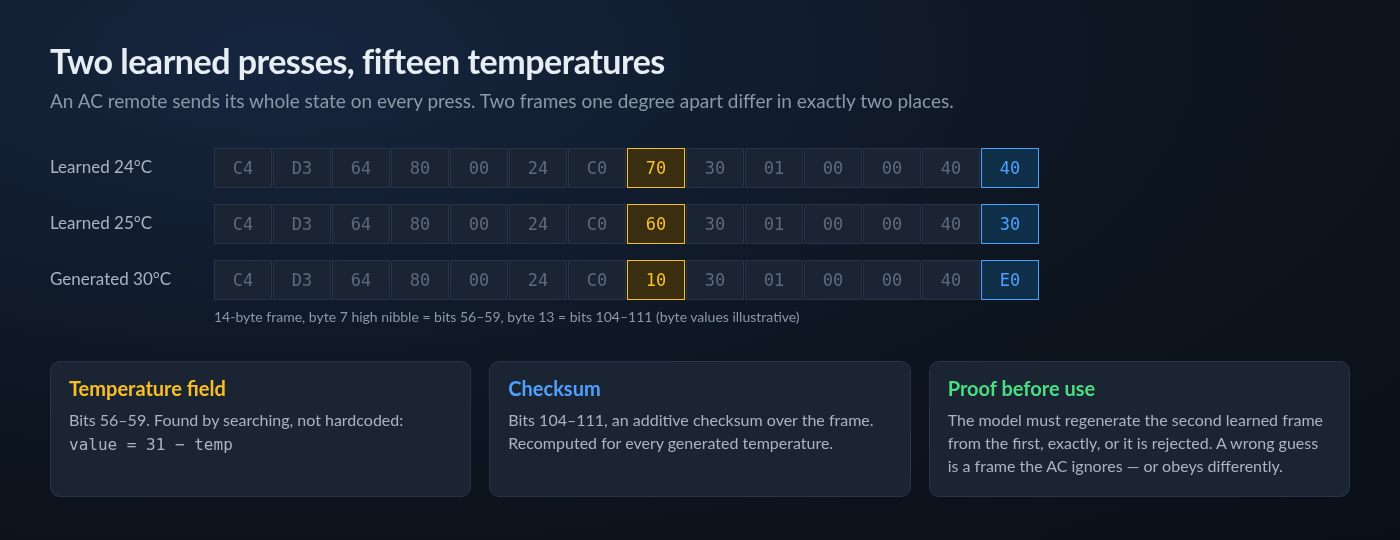
But two frames one degree apart differ in exactly two places: the temperature field and the checksum. So Tower learns two temperatures and searches for the encoding rather than having it hardcoded. On the master bedroom AC it found the temperature in bits 56–59, stored as 31 ? temp, and an additive checksum in bits 104–111.
The important rule is that the derived model has to reproduce the second learned frame from the first, exactly, or it is thrown away. A wrong guess here is not a harmless error. It is a frame the AC silently ignores or, worse, one it obeys differently. On the real unit, generated frames for 24°C and 30°C were both accepted — the compressor worked harder at 24 and went quiet at 30. Two learned presses, every temperature from 16 to 30.
The power-on case needed a workaround of its own. I tried borrowing a complete remote definition from a public IR database, and the borrowed set had no power-on frame that this unit would accept. So power-on comes from a learned frame, and the temperature frames come from the derivation.
Power, Climate and the Cars
A few of the Tuya plugs and the car charger's smart breaker have energy meters in them. /house/power auto-detects every device that reports power, samples it once a minute and rolls it up into daily kWh. The car charger breaker turned out to pack voltage, current and power for the phase into one encoded data point, which took a little decoding.
/house/climate does the same for temperature and humidity every five minutes and keeps a year of it. The funny part is that the only climate sensor in the house is the one built into an IR blaster, and that blaster answers no local status query at all. So climate reads the local device first and falls back to the Tuya cloud — the cloud half is not a nicety here, it is the only source for the one sensor I have.
The cars got a section too. Each one has its owner's manual turned into proper pages with diagrams, which is more useful at the side of the road than a PDF I cannot find. For the BAW E7 there is now a real efficiency figure: the charger breaker's energy meter gives kWh in, the odometer readings I already log in FinanceTracker give miles out, and Tower divides one by the other. The Perodua Ativa has its manual on there as well.
Automations picked up a power_done trigger in the same pass: run a list of actions when a device stops drawing power. It is the kind of trigger that sounds trivial until you notice how many household chores end with "and then something finishes".
The Camera Learned to Label Itself
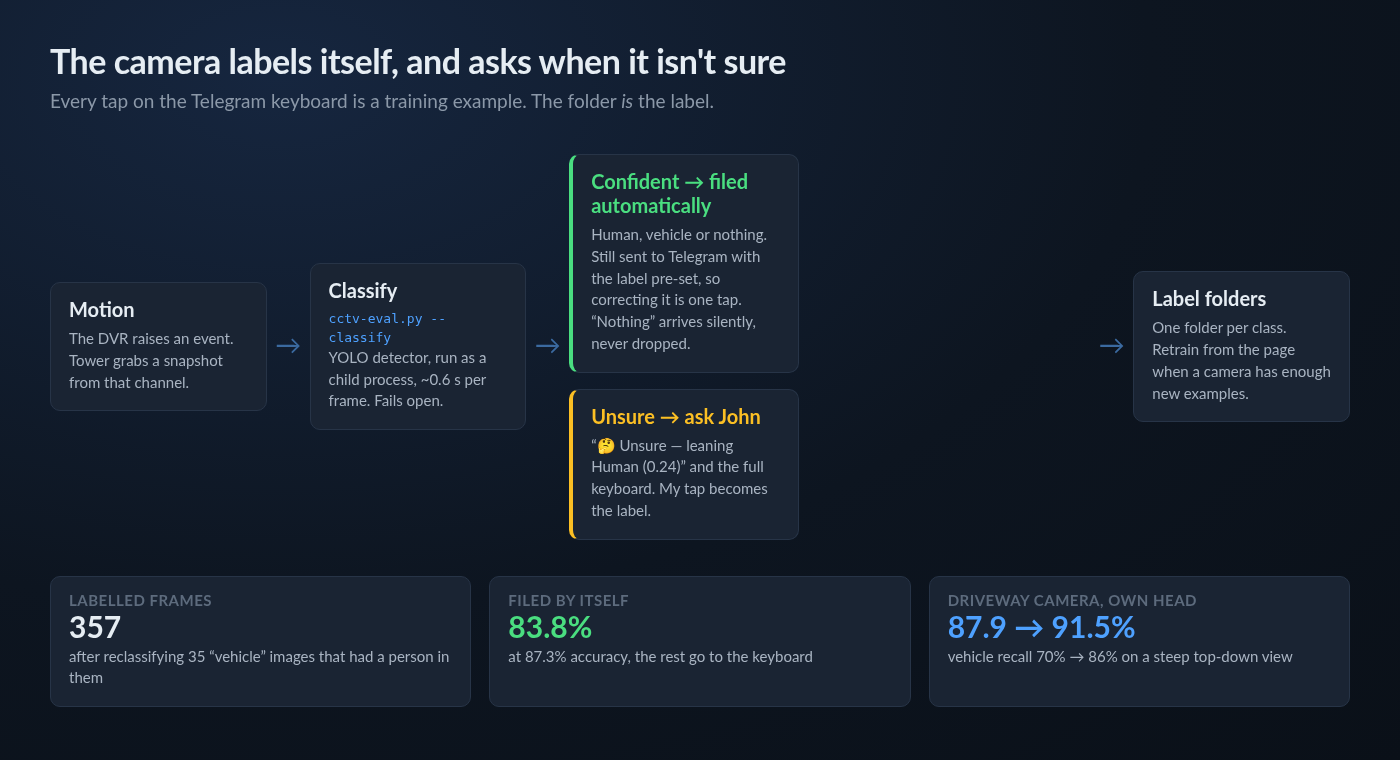
I have an analog Hikvision DVR with cameras around the house — a long way from the Raspberry Pi security system I built years ago. Tower now subscribes to its motion events, grabs a snapshot from that channel and sends it to Telegram with a small keyboard: human, vehicle, our car, or nothing. Whatever I tap files the snapshot into a folder for that class. The folder is the label. There is no table and no sidecar file.
That turned into a training set without me really meaning it to. After a few weeks of tapping I had enough to evaluate an off-the-shelf YOLO detector against my own labels.
The Labels Were Wrong, Not the Model
The first evaluation produced a result that should have made me suspicious. Checking for a vehicle before checking for a person scored better than the other way round — 85.6% against 79.1%. That is backwards. My rule had always been that a human in frame is a human, car or no car.
The measurement was right and the conclusion was wrong. When I looked, 35 of the 103 images in my "vehicle" folder had a clearly visible person in them. I had been tapping "vehicle" whenever a car arrived, even when someone was walking past it. I reclassified them, and the two orderings swapped places immediately: human-first 86.0%, vehicle-first 80.7%. The lesson I have written into the project notes is: when a detector ordering beats the obvious one, suspect the labels before the model.
Now the classifier runs on every snapshot. When it is confident it files the frame itself — 83.8% of them, at 87.3% accuracy — and the Telegram message still arrives with the label already set, so correcting it is one tap. When it is unsure it says what it was leaning towards ("Unsure — leaning Human (0.24)") and shows me the full keyboard. A "nothing" verdict sends the photo silently rather than dropping it, because ten of my 206 labelled humans score as nothing, and a dropped message is exactly the one that would have mattered. "Our car" is never assigned automatically. The detector scored our car 0.455 and other cars 0.471, which is no separation at all.
The Driveway Camera
One camera looks steeply down on the driveway, so cars arrive roof-first and half cut off. The stock detector scored 7 of its 70 labelled vehicles at exactly zero, which no threshold can rescue. Per-camera thresholds gained less than a point. What worked was a small logistic head trained on the detector's own internal features for just that camera: accuracy went from 87.9% to 91.5% and vehicle recall from 70% to 86%. The other camera did not improve, so it does not get a head and keeps the simple rule. There is a Retrain button on the page for when the folders grow.
A To-Scale Drawing of the House
This is the one I had wanted for longest. /house/schematic draws the house to scale from a single hand-editable XML file — every floor, every wall, every socket. Wall-mounted items are stored as a wall plus a distance along it, so moving a wall carries its sockets with it. Lengths can be written in millimetres, metres, inches or feet, because the house was not all measured by the same person.
The same drawing has five views: the plan, electrical, plumbing, network, and a single-line diagram drawing one tree per incoming supply. Rooms are matched to the Tuya room names, so live device state is overlaid on the plan and a device can be switched from the drawing. There is an edit mode where walls and fittings can be drawn with the mouse, snapping to walls, and it writes back to the same XML file. It refuses to save if the file was hand-edited underneath it, rather than overwrite my edit.
It follows the same rule as the mail profiles in Part 2: the file is the only store, it is seeded once from an embedded default, and a file that does not parse is rejected whole rather than half-loaded.
The Things Nobody Sees
Cutting Idle CPU by Six Times
Tower had quietly grown to 23 background workers, each with its own loop and its own timer. On a 2010 i5 that is not free. I measured it at idle and it was using 16.3% of a core with nobody looking at it.
| Change | Before | After |
|---|---|---|
| Service status checks | 11 systemctl forks every 2 s | one batched call |
| Heavy stats sampling | always | only while a page is open |
| SMART and WAN polling | 5 min / 60 s | 30 min / 5 min (~2,700 fewer sudo calls a day) |
| Live page updates | a timer per open page | pushed from one shared state |
| Idle CPU | 16.3% | 2.7%, heap 56 MB |
After that, the 23 loops were replaced by one job runner and one schedule table. That was not a performance change — 23 sleeping timers cost nothing. It means there is finally one file that answers "what runs, how often, and when did it last succeed", and a page that shows it.
One of the status checks had a nasty side effect I only found afterwards. A couple of my apps are socket-activated: they start on the first connection and stop after fifteen idle minutes. Tower was checking whether they were up by connecting to their port — which is exactly what starts them. So every five seconds Tower woke them up, and the idle stop could never fire once. It now asks systemd about the socket instead of knocking on the door.
A Health Page That Joins the Dots
The storage page had shown six pending sectors on one disk for a week. I had seen the number. What nothing on the page said was that this disk is one of four under the linear LVM volume that holds 3.6 TB with no redundancy — so those six sectors put the entire pool one failure away from gone.
/server/health exists to say that sentence. It reads the disk layout, works out which volumes each physical disk belongs to, and ranks findings by what they mean rather than what they are: a defect on a spanned pool member is critical, the same defect on a standalone disk is a warning. It also flags undeliverable SMART alerts, ageing disks, a NIC running below gigabit, swap pressure and full filesystems.
A Lock on the Front Door
Tower can restart services, edit firewall rules, shut down the Pis and switch the ACs. Until September it did all of that with no login, on the reasoning that it was only reachable from my LAN and Tailscale. That reasoning got weaker every time I added a control. Every route now sits behind a password, the gRPC channel MediaBox uses is bound to loopback only, and the broad sudo rules were replaced by small root-owned wrapper scripts that validate their arguments before doing anything.
A UI Overhaul and Themes
Part 2 ended with 21 pages. Tower now has 43, and the old layout did not survive that. It was rebuilt as a denser console: the navigation is data rather than markup, Bootstrap is gone, all sections share one CSS system, and the home page is a status wall that leads with whatever needs attention. More recently it gained swappable themes, including a light one.
Where It Stands
Tower is now 43 pages and a little over a thousand tests, across 591 commits since mid-June. It still deploys the same way it always has — stop, publish, start — and it now starts faster, since the published build is precompiled to native code.
- Network: loop detection that would have caught the September outage, and a topology map that is actually right.
- Infrared: every AC temperature from two learned presses, with no cloud subscription.
- Cameras: 357 labelled frames, 84% of motion events filed without me.
- House: a to-scale schematic with live device control, room climate and per-device energy.
- Cost: idle CPU down from 16.3% to 2.7% of a core.
If Part 2 was the point where Tower stopped being a dashboard, Part 3 is where it stopped being only about the server. Most of what it watches now is physical: walls, wires, radios and the occasional car on the driveway. That is also why it has moved under Atom as its own project — it is no longer one smart-home post among many.
What comes next is specific. The driveway camera's "our car" class needs around a hundred examples and a colour or plate check before it can be automated. The non-redundant storage pool needs a real decision now that Tower is the one pointing at it. And the Part 2 backup trash folder still has no pruner, which I am still deliberately leaving alone until it costs real space.
The source remains private. Even more of my house is wired into it than before.