Atom is the computer in the corner of my house. It is a repurposed desktop with a 2010 Intel Core i5-660, 3.6 GB of RAM and four second-hand 1 TB hard disks, running Ubuntu 22.04. It was never meant to be a server. It is now the one machine that runs my media, my finances, my website publishing, my backups and most of the house.
Each piece has had its own post as it was built. This page is the overview: everything Atom does today, in one place, with links to the posts that explain how each part got there. I will keep it updated as the system grows.
Why One Old PC
The honest answer is that I did not want to spend money. Everything I had built at home before this — the Raspberry Pi media centre, the Pi media box, the Pi security system, the personal assistant — lived on its own small board, with its own SD card to corrupt and its own SSH session to remember. Atom consolidated all of that onto hardware I already owned.
The constraint shapes everything on this page. With 3.6 GB of RAM and a sixteen-year-old CPU, nothing gets to be wasteful. There are no containers and no orchestration — just systemd services, SQLite databases and .NET apps. Apps I only use occasionally are socket-activated, so they start on the first request and stop after fifteen idle minutes. Tower, which watches everything else, idles at 2.7% of one core.
At a Glance
| Area | What runs |
|---|---|
| Hardware | Core i5-660 @ 3.33 GHz, 4 threads, 3.6 GB RAM, 110 GB system disk |
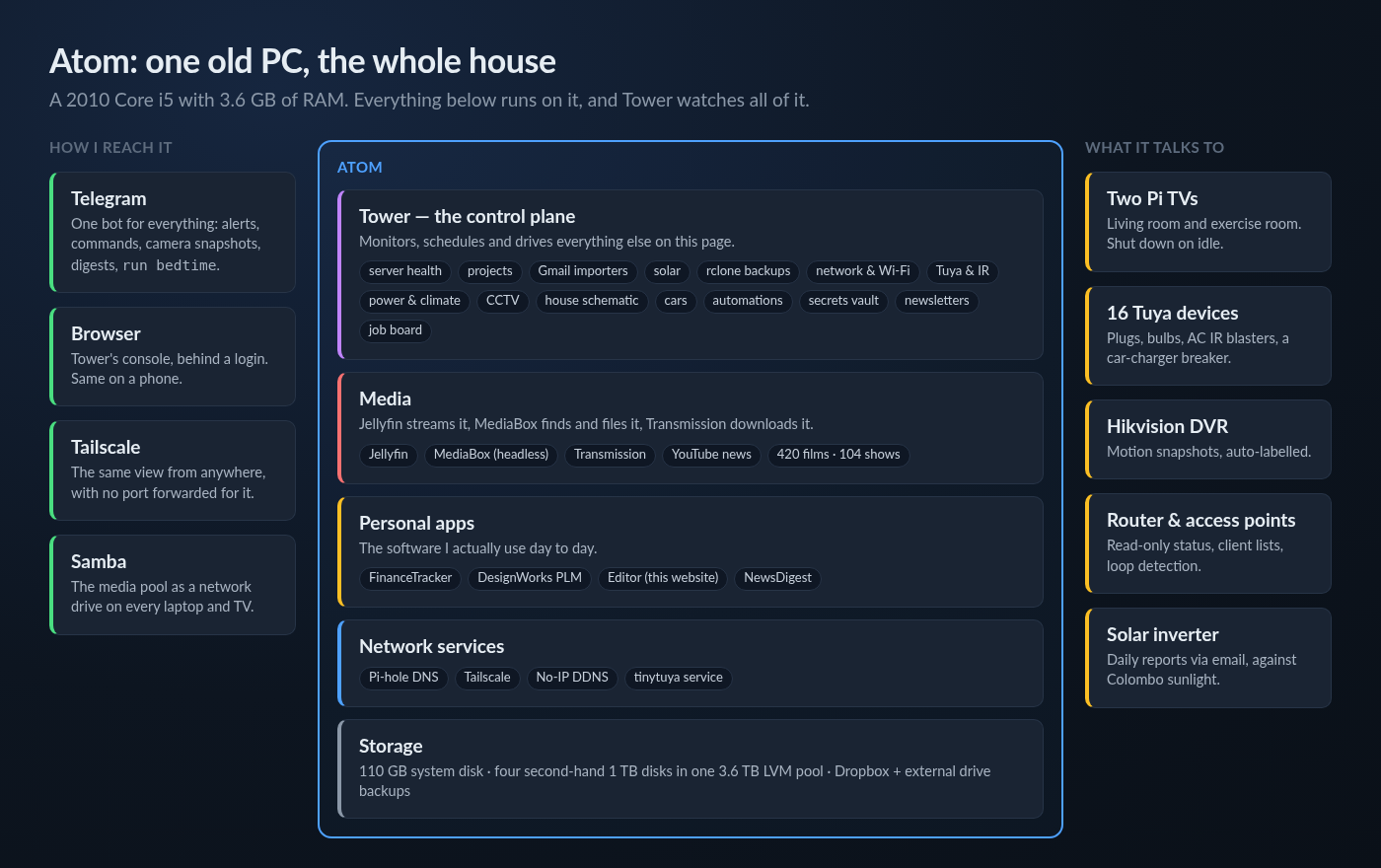
| Storage | 4 × 1 TB second-hand disks in one 3.6 TB LVM pool, shared over Samba |
| Control plane | Tower — .NET 10 Blazor, 43 pages, 1,000+ tests |
| Media | Jellyfin, MediaBox, Transmission — 420 films and 104 TV shows |
| Personal apps | FinanceTracker, DesignWorks, the Editor for this site, NewsDigest |
| Network | Pi-hole DNS, Tailscale, No-IP dynamic DNS |
| House | 2 Raspberry Pi TVs, 16 Tuya devices, a Hikvision DVR, 2 range extenders, a solar inverter |
| Front door | One Telegram bot, a password-protected web console, Tailscale for remote access |
Storage and Sharing
The media pool is four second-hand 1 TB disks joined into a single 3.6 TB volume with LVM, shared to every laptop and TV in the house over Samba. It is linear, not mirrored — cheap capacity for things I can re-download. How that came together is in Building a Practical Home NAS on Ubuntu Server.
- One 3.6 TB volume from four mismatched disks, with SMART monitoring on every one.
- Samba shares for the media library, so a Jellyfin client and a file browser see the same folders.
- Backups with rclone to Dropbox and to an external drive pinned by its filesystem UUID, so a reboot reshuffling drive letters can never make it sync the pool onto itself.
- Hot copies of every live SQLite database, plus the loose files that turned out to be irreplaceable — encryption key rings and device keys that existed nowhere else.
- A health audit that knows which disks belong to the unmirrored pool, so a few bad sectors there show up as critical instead of as a number.
Media
This is where Atom started. MediaBox 2026 is my own .NET app that finds and files everything; Jellyfin serves it.
- Jellyfin streams the library to the TVs, phones and laptops.
- MediaBox watches RSS feeds for new episodes of the shows I follow, hands them to Transmission, and files finished downloads into the right TV or movie folder.
- A watchlist and a library view that show which episodes have aired and which are missing, with a one-click magnet picker to fill the gaps.
- The Sri Lankan evening news, downloaded from YouTube every night so it is waiting on the TV.
- Two Raspberry Pi TVs, in the living room and the exercise room, each running a small agent that reports its state and shuts the Pi down when nobody is watching.
- Watch analytics — what was played, by whom and when — and a transcode monitor so I can see when the old CPU is struggling.
Tower — The Control Plane
Tower is the reason Atom feels like one system rather than a pile of services. It is a .NET 10 Blazor app that watches everything else on this page, runs the scheduled work, and owns the Telegram bot. MediaBox no longer has a UI or a scheduler of its own — Tower drives it over gRPC. The full story is in three parts: Part 1, Part 2 and Part 3.
Watching the Server
- Live CPU, memory, disk, network and temperatures, with SMART details that name the actual fault.
- A card for every app on the box — status, resources, logs, start/stop/restart, and whether the deployed build matches GitHub.
- One job runner and one schedule table for all background work, with the last run, duration and error of every job.
- Firewall rules, Pi-hole statistics, internet usage against the ISP billing cycle, and maintenance reboots that wait until nobody is streaming.
Doing the Paperwork
- Gmail importers that turn emailed bills, bank statements and card alerts into FinanceTracker entries — 1,516 bills going back to 2014 and 610 statements going back to 2018.
- Solar tracking from the inverter's daily report emails, plotted against Colombo's actual sunlight so a monsoon week does not look like a fault.
- A job board built from job-alert emails, and a weekly newsletter digest summarised by Claude and sent to Telegram.
- A secrets vault with AES-256-GCM encryption and a key that is never stored.
Running the House
- Tuya devices controlled locally — plugs, bulbs, a car-charger breaker, and AC units through IR blasters, with every AC temperature derived from two learned button presses.
- Power and climate — per-device energy sampled every minute, and room temperature and humidity kept for a year.
- Cameras — motion snapshots from the DVR sent to Telegram, with a classifier that labels 84% of them by itself.
- The network — every device on the LAN identified, a topology map by Wi-Fi association, read-only router status, and loop detection.
- A to-scale house schematic with electrical, plumbing and network views and live device control.
- Automations such as
run bedtimefrom Telegram, and a trigger for "when this device finishes drawing power". - The cars — their manuals as pages, and real EV efficiency from the charger's meter and the odometer log.
Personal Apps
- FinanceTracker — my personal finance app in .NET Blazor: accounts, transactions, loans, stocks on the Colombo Stock Exchange, tax, gold and assets, all converted to LKR at historical exchange rates. Receipts can be sent to it as photos over Telegram.
- DesignWorks — a LAN-hosted product lifecycle management app for parts, revisions, bills of materials and change orders, backed by PostgreSQL.
- The Editor — the CMS I write this website in. It uploads images, publishes posts through the site's API, and asks Tower to push files to the live server.
- NewsDigest — a daily job that reads news feeds, summarises them with Claude and sends the digest to Telegram.
Network Services
- Pi-hole is the DNS server for the house and blocks ads for every device on the network.
- Tailscale gives me the whole system from anywhere, without forwarding a port for it.
- No-IP keeps a hostname pointed at a home connection whose IP changes.
- A local tinytuya service talks to the smart devices directly over the LAN, so the house does not stop working when the Tuya cloud does.
One Front Door
The design choice I am happiest with is that there is a single way in for each kind of task. For anything that needs to reach me, or that I want to trigger from my phone, it is one Telegram bot: download alerts, camera snapshots, bill imports, digests, network loop alerts, run bedtime. For anything that needs a screen, it is Tower's console, behind a login, reachable over Tailscale. I no longer SSH into the box to find out what it is doing.
Posts in This Project
- Building a Practical Home NAS on Ubuntu Server — the storage pool, Samba and the first automation
- Tower: Building a Home Server Dashboard in Blazor — replacing a pile of SSH sessions with one console
- MediaBox 2026: Bringing the Whole Home Media Stack Together — the media pipeline
- Tower Part 2: The Dashboard Started Reading My Email — importers, solar and backups
- Tower Part 3: It Started Learning the House — network, infrared, cameras and the schematic
Where It Is Going
The weakest part of Atom is the one everything sits on: a storage pool with no redundancy on second-hand disks. That decision is next, and Tower's health page will not let me forget it. After that, the plan is the same as it has always been — add what the house actually needs, keep the idle cost low, and write it up here when it is worth a post.