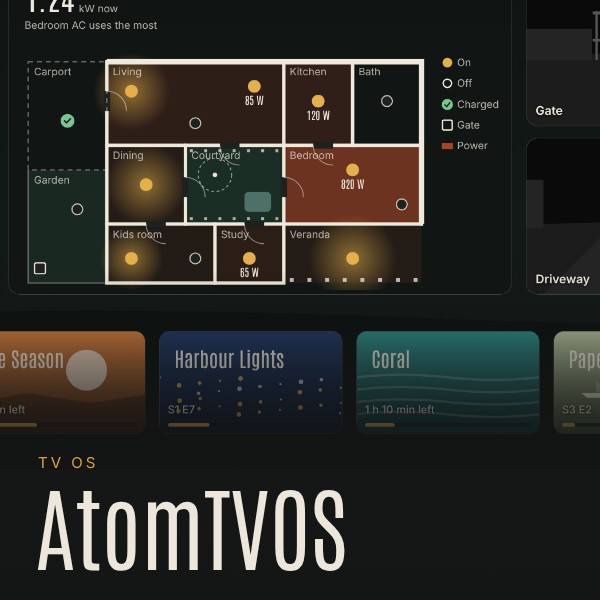
There are two dumb 1080p TVs in our house, and behind each of them sits a Raspberry Pi. Until last week both Pis ran Raspbian, opened a browser on boot and loaded Jellyfin's web page full screen. It worked, in the sense that video played. It also looked like a web page, carried a full desktop OS underneath that nobody needed, and knew nothing about the house it was sitting in.
Meanwhile, Tower had learned the house: the floor plan, every Tuya plug and its power draw, the gate, the cameras and the car charger. All of it lived on a dashboard that I had to open on a laptop. The TV, the one screen everyone in the house actually looks at, showed none of it.
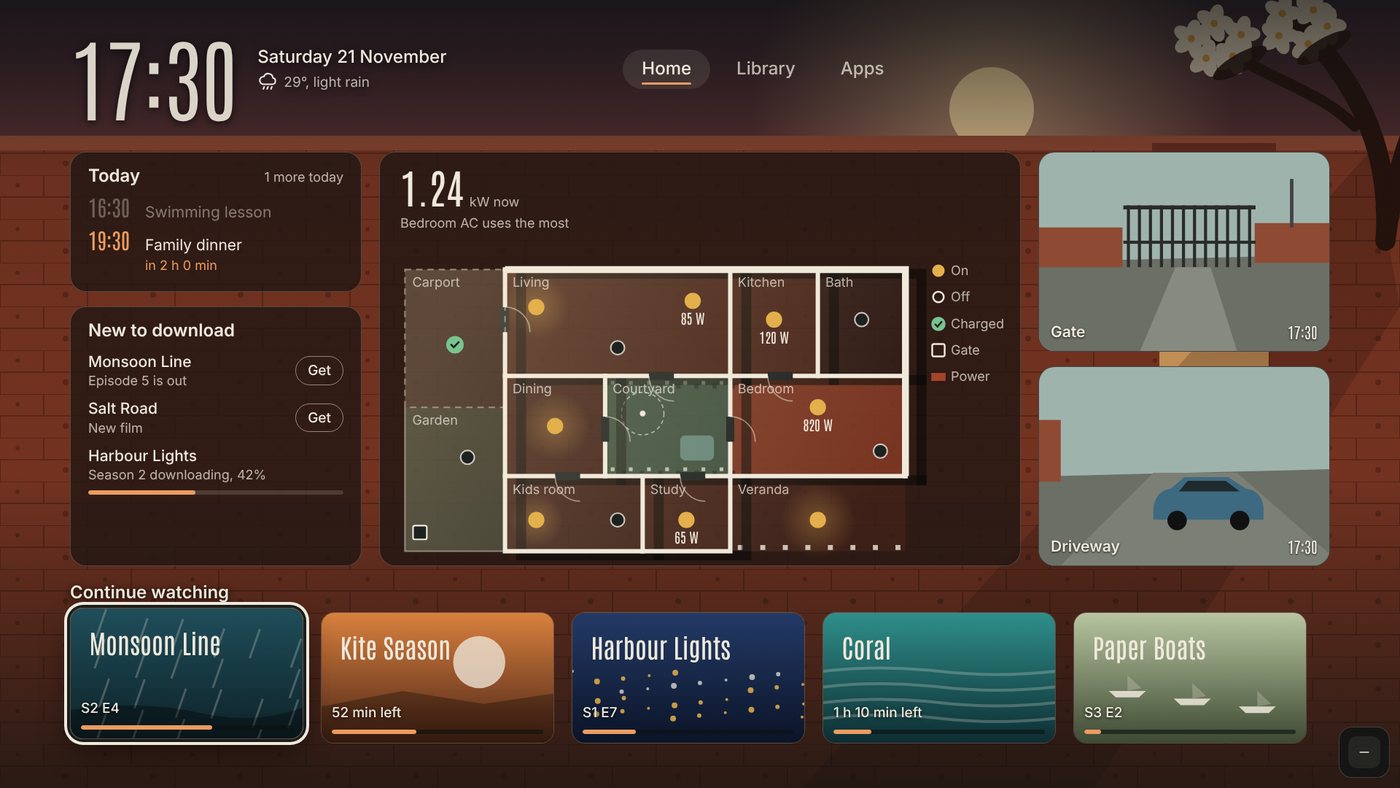
So I wanted a proper TV operating system. Not Pi OS with Chromium in kiosk mode, but a small Linux image that boots straight into a home screen built for this house: the floor plan with live device states, the cameras, the family calendar, new downloads, and the media library one button away.
I need to be upfront about one thing before going further: I did not write this OS. Claude did. I wrote the requirements, made the decisions, moved SD cards and cables around on the bench, and said "no, not like that" a fair number of times. Every line of C#, every Buildroot config, every systemd unit and every design round came out of Claude Code running on Atom, my home server. This post is partly a project write-up and partly a showcase of what that looks like when you point it at real hardware and a real house. The first commit landed on a Saturday evening. By Tuesday morning the bench Pi was booting its own OS, playing films and showing the house.
What I Asked For
The brief started as a conversation and turned into a set of planning documents that now live in the repo's docs folder. The requirements that mattered:
Boot straight into a home dashboard. No desktop, no login prompt, no browser chrome.
The house in the middle. A top-down floor plan with live device states and power draw. Cameras on the right. Today's calendar and new media to download on the left. Continue watching along the bottom.
A library one swipe away, Jellyfin-style, plus YouTube and the Sri Lankan teledrama site my mother watches.
Notifications from Tower (gate opened, car finished charging, someone at the gate) that slide in at the top right and fade. A gate event must never pause what is playing.
Two boards, one image. A Pi 4B (2 GB) and a Pi 3B (1 GB). Wired today, but Wi-Fi must work.
No profiles. Each Pi has a role: my TV, or the TV of my three-year-old, which shows only allowed shows.
Works without Tower. If the server is down, the TV still plays media and shows the last known state.
The look of couch-tv: full-screen scenes, a big glass clock, glass panels and a Continue watching row.
One TV supports HDMI-CEC and the other does not, which matters later.
The Platform: Buildroot and Avalonia
The first real decision was what to build the OS out of. Claude's proposal, which I accepted, was a custom embedded Linux image built with Buildroot, pinned to its 2025.02 long-term-support branch, running a single native C# app as the entire user interface. No window manager, no compositor, no browser. The app is written in Avalonia and draws straight to the GPU through DRM/KMS.
The reasoning was sound for my situation. I work in C#, and Tower is Blazor on .NET 10, so the TV can share Tower's models and I can still read the code. Buildroot produces a small root filesystem containing only what the TV needs, and its LTS branch keeps getting security fixes for three years. The trade-off is that nothing installs itself: the Pi video drivers, ffmpeg, mpv and every library the .NET runtime touches have to be in the build config.
A few of the calls Claude made on its own, and wrote down with the reasons in the design spec:
One aarch64 image for every board. The Pi 3B's Cortex-A53 runs 64-bit, and one kernel (
bcm2711_defconfig) boots both the Pi 3 and the Pi 4. Which TV a Pi drives is a setting, never baked into the image.systemd over BusyBox init, for restart-on-failure, journald and built-in mDNS. Each TV answers as
atomtv-<serial>.local.An external Bootlin toolchain, to save an hour on every clean build.
Build politely. Atom also runs Tower, Jellyfin and MediaBox, so the build runs under
nice -n19 ionice -c3with two jobs. The spec lists "starving Tower" as an explicit anti-goal: a build that makes the house slow is a failure even if it produces an image.
Spikes First: What a Pi 3B Can Actually Draw
Before any of the shell existed, Claude ran throwaway spikes on the bench Pi 3B to answer the risky questions. Can Avalonia draw at a usable frame rate? Can mpv play 1080p with hardware decoding? These spikes found more problems with my bench than with the software.
The first results looked fine: 28 fps with 14 glass cards scrolling, 62 fps with just the clock. Then the notes started filling with caveats. vcgencmd get_throttled returned 0x50005: the Pi was under-voltage and running its ARM cores at half speed. A new supply didn't fix it; a thicker USB cable did. With no screen attached, the HDMI connector only offered 1024×768, so those first Avalonia numbers weren't at 1080p at all. Once the real TV was plugged in, mpv dropped 201 frames out of 660, because the TV's EDID advertised a 120 Hz mode first and the GPU was presenting four vsyncs per frame. Pinning the output to 1920×1080@60 fixed that.
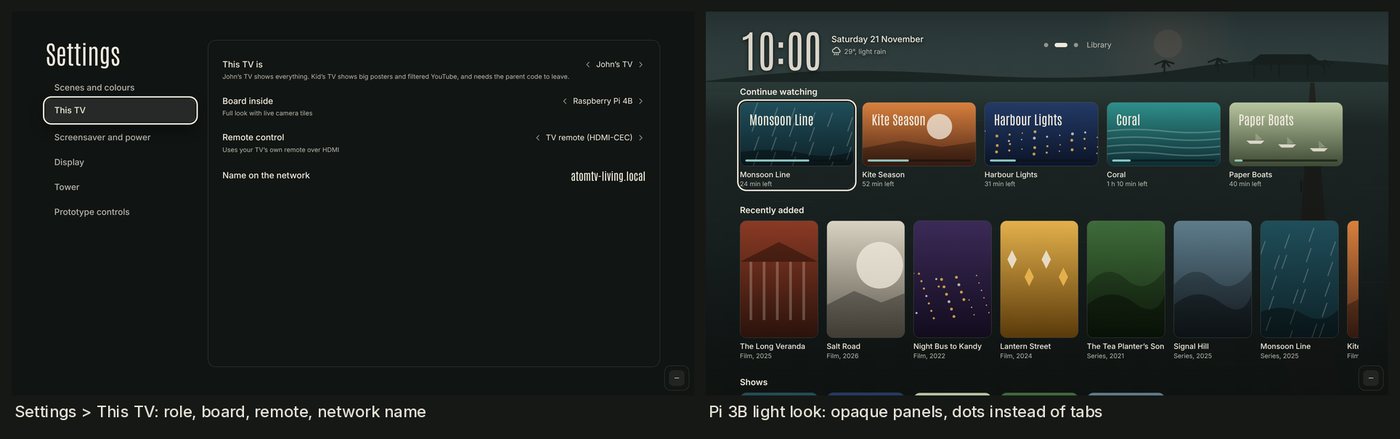
The honest numbers, at real 1080p60, were sobering. Fourteen moving cards ran at about 19 fps. That number shaped the whole UI: the Pi 3B gets a "light look" with opaque panels, no blur and no motion, and the design rule became "animate only what has focus".
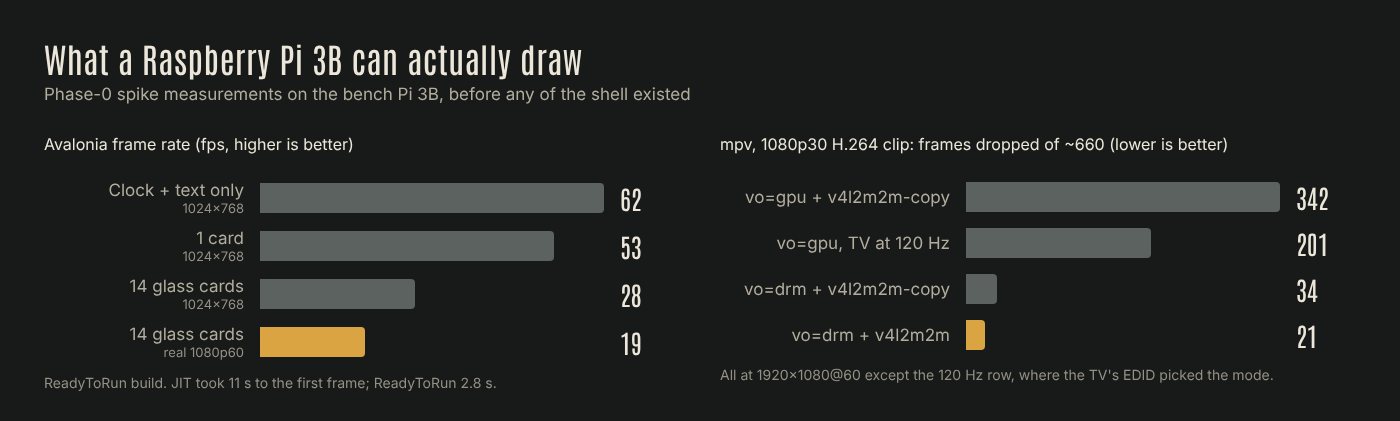
Two other findings mattered later. ReadyToRun compilation is mandatory: the JIT build took 11 seconds to its first frame, ReadyToRun took 2.8. And the Pi 3B has no heatsink: 72.5 °C a minute after boot.
The Base OS
The first full image build on Atom was the long one. Every build after that was incremental, measured in minutes. There have been 20 builds so far, and two of them are worth telling.
The first: the stable Bootlin toolchain ships with old kernel headers, and Buildroot silently drops systemd-networkd when the headers are too old. The image built, booted and had no network. Claude added dhcpcd as a stopgap, then switched to the bleeding-edge toolchain with newer headers and, more usefully, made the build fail outright if networkd, resolved, dropbear or the shell are missing from the image. That class of problem can't happen quietly again.
The second: the boot splash waited for a dev-fb0.device unit that never appears on this kernel, so every boot stalled for exactly 90 seconds before timing out. It now polls for the vc4 framebuffer instead.
The splash itself is my logo, the robot-head line drawing, with "AtomTVOS, by iamJohnnySam" under it. The Pi firmware's rainbow square is disabled, so the screen stays black until the splash appears. Here is the board config that both Pis share:
# AtomTVOS — shared by Pi 3B/3B+/4B. The firmware picks start.elf (Pi 3) or start4.elf (Pi 4) itself.
# Active system slot: tools/ota.sh rewrites this line (slot-a/ = p2, slot-b/ = p3)
os_prefix=slot-a/
kernel=Image
arm_64bit=1
disable_overscan=1
disable_splash=1
dtoverlay=vc4-kms-v3d
max_framebuffers=2
gpu_mem=128
enable_uart=1
dtoverlay=miniuart-bt
dtparam=audio=on
Cold boot on the Pi 3B now looks like this:
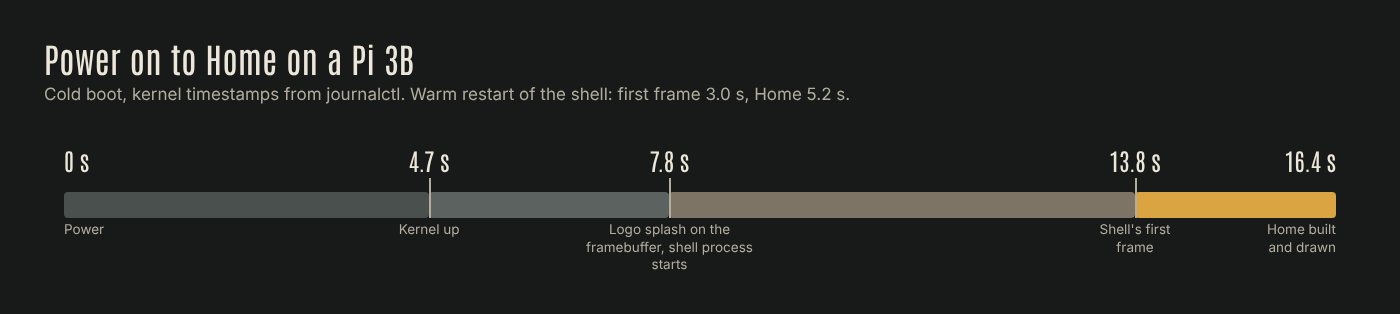
Most of the six seconds between the shell starting and its first frame is .NET and Avalonia starting from a cold SD card. On a warm restart it's 3 seconds to the first frame and 5.2 to Home. It's not instant, but compared to Raspbian, a desktop and a browser, it's a different experience.
Updates Without Pulling the SD Card
The SD card has two system slots, A and B, plus a data partition for settings. The planning docs called for RAUC to manage this. For now Claude wrote a simpler tool: tools/ota.sh writes the new root filesystem into the slot that is not running, copies that slot's kernel and device trees, flips os_prefix in config.txt and reboots. It refuses to touch the partition it's running from, whatever config.txt says. If the new slot fails to boot, rolling back is a one-line edit. A separate deploy-shell.sh swaps just the app over SSH, which is the fast loop for UI work.
Designing a Home Screen for One House
The design work happened before the shell was written. Claude built a single-file HTML prototype at 1920×1080, driven by arrow keys, Enter and Back, so I could judge it on the actual TV through the old Chromium kiosk. Three directions were offered. I picked the one where the house is the home screen.
The floor plan is drawn the way a Geoffrey Bawa architect's plan would be: lime-washed walls, an open courtyard with a frangipani and a pond, colonnades and door swings. It is lit by the real day. Walls cast shadows that turn with the sun. At night only the lamps that are actually on light their rooms. Rooms warm towards laterite red as they draw more power. Behind everything sits a scene from a Bawa veranda that changes through the day, and each scene carries its own accent colour.
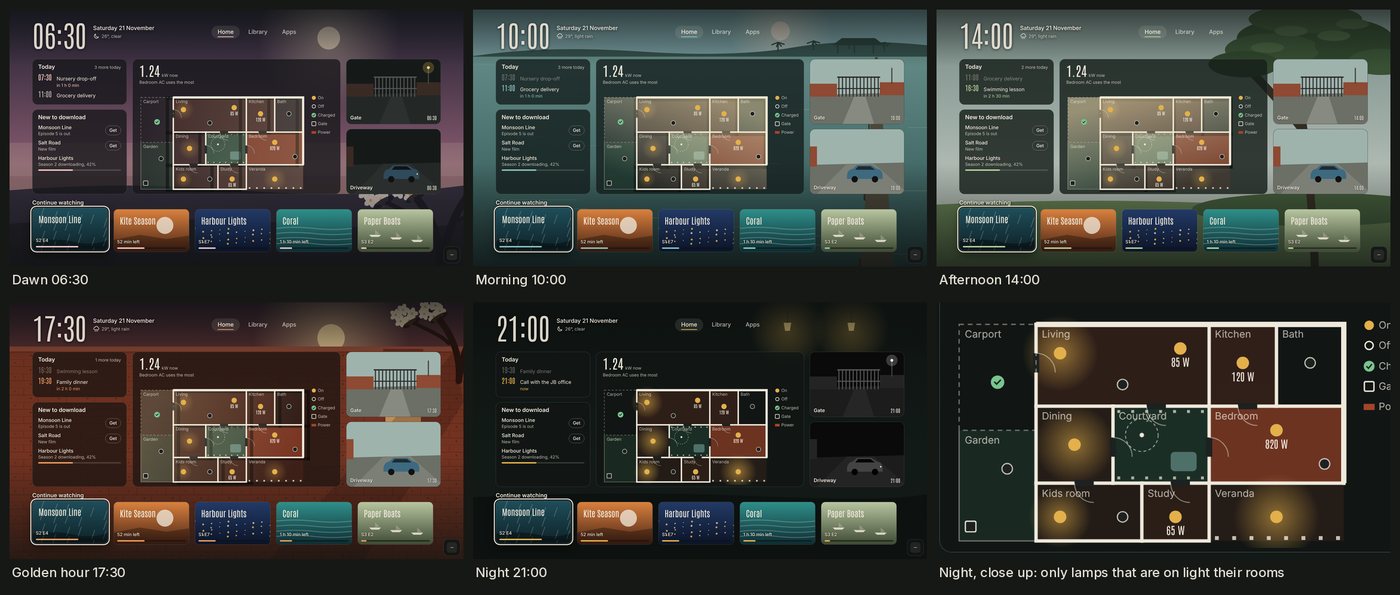
The design went through nine rounds, and every round's screenshots are kept in the repo. One review round caught a bug where the device pins were drawn in the wrong positions on the plan. Another landed eight fixes in one go: the sun on the plan, five scenes, solid panels, larger text. The last two rounds were me asking for smaller text again. It is now 24 px for headings, 21 for body, 19 for labels and 18 for secondary text.
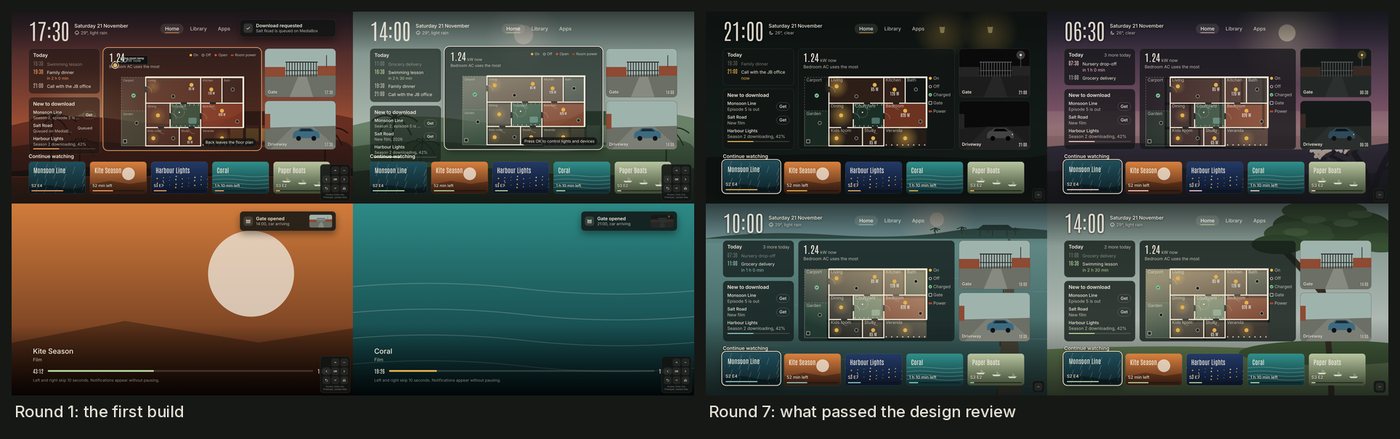
A note on the screenshots in this post: they come from that prototype, rendered at 1920×1080, and the titles, posters, calendar entries and camera frames in them are sample data. The Avalonia shell running on the TV is a port of this design, built from the same tokens and the same rules, and on the real TV it shows our actual library and cameras. I'd rather not publish my family's calendar and my gate camera on the internet.
How It Connects to the House
This is the part I'm most impressed by, because it shows Claude reading what already existed instead of building what the plan said.
The planning docs proposed a new SignalR hub inside Tower, a new TV API, pairing tokens and an event bus. Before writing any of it, Claude went through the Tower codebase and found that most of it already existed. Tower's family screens feature already streams the whole house as server-sent events at /family/events: a snapshot, then a "part" whenever calendar, power, devices, gate, cameras, car, downloads or events change, each with its own freshness window. And Tower already manages Raspberry Pis through a small HTTP API (stats, config, shutdown, idle reset, logs).
So the TV does two simple things. It keeps one SSE connection to Tower and maps each part onto the home screen. And it runs its own small web server that speaks exactly the same Pi-agent API, so Tower treats the TV as just another Pi. The Tower side of the change was one device entry in the config. No new Tower API at all.
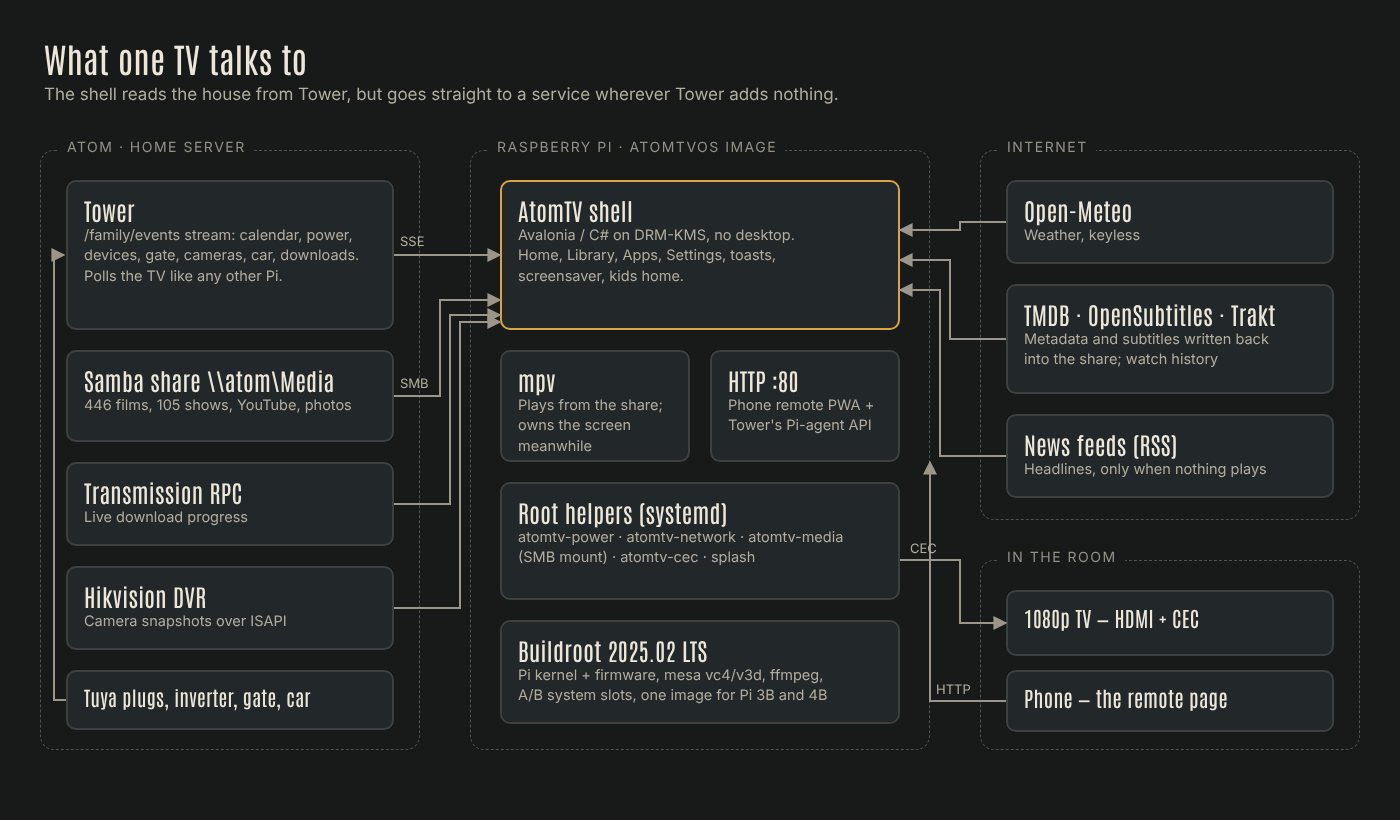
Then I added a rule: if it makes sense for the TV to talk to a service directly instead of through Tower, go ahead. That produced a clear split:
Through Tower: calendar, power, device states, gate, car, and toast-worthy events. Tower is where that data already comes together.
Direct: weather from Open-Meteo (Tower has none), download progress from Transmission's RPC, news headlines from the same RSS feeds Tower's daily digest uses, and camera snapshots from the Hikvision recorder over ISAPI.
Still through Tower, on purpose: requesting a download, because MediaBox's gRPC is loopback-only by design and opening it to the LAN is my security call. Live camera video is still open too. It leaves the recorder Hik-Connect encrypted, and doing it on the TV means sharing Tower's decryption code as a library.
Tower restarts on every deploy, so the TV saves the last snapshot it received. A TV that boots while Tower is down shows the last known picture with "Tower offline", never a broken screen and never sample data.
The Floor Plan, Live
The floor plan comes from the same house schematic Tower renders. Pins show each device's state, lamps glow when they're on, and wattages sit next to the plugs that measure them. OK enters the plan, the arrow keys hop between pins, and OK on a pin opens a panel with its state, a control, and today's power as 24 hourly bars.
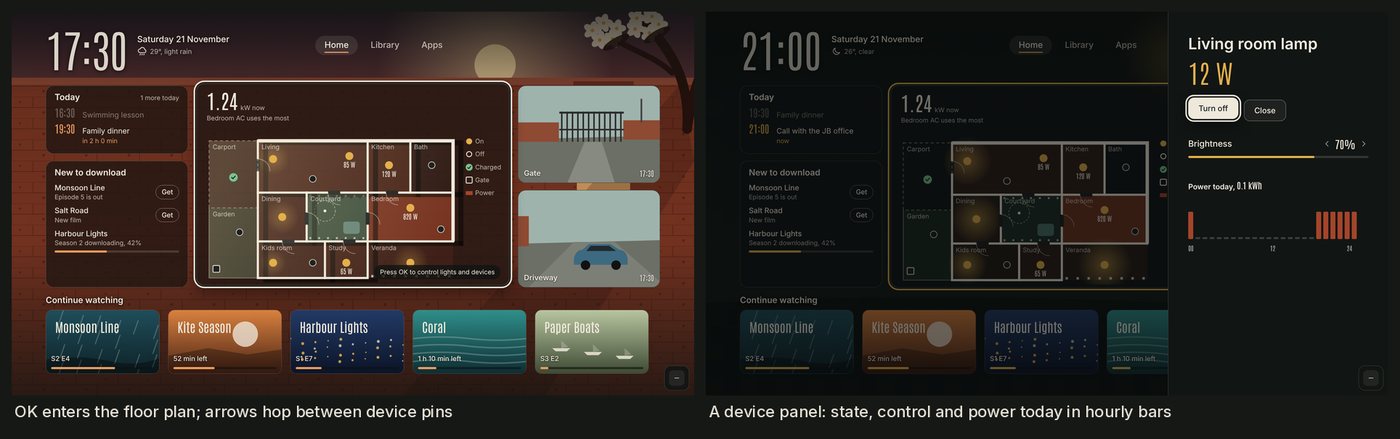
The two cars on the plan are drawn from above at their real proportions, from the make, paint colour and dimensions stored in Tower, with mirrors, lights and a green glow while one charges.
Notifications
Toasts slide in at the top right, up to three at a time, at three levels. Info (the gate, downloads) fades after about 7 seconds. Important (the charger finishing) gets a brass border and stays about 12 seconds. Critical (a person at the gate, according to Tower's camera classifier) is solid red and stays until someone acts on it. Only critical can interrupt anything. The gate opening during a film is a small toast over the picture, and the film keeps playing.
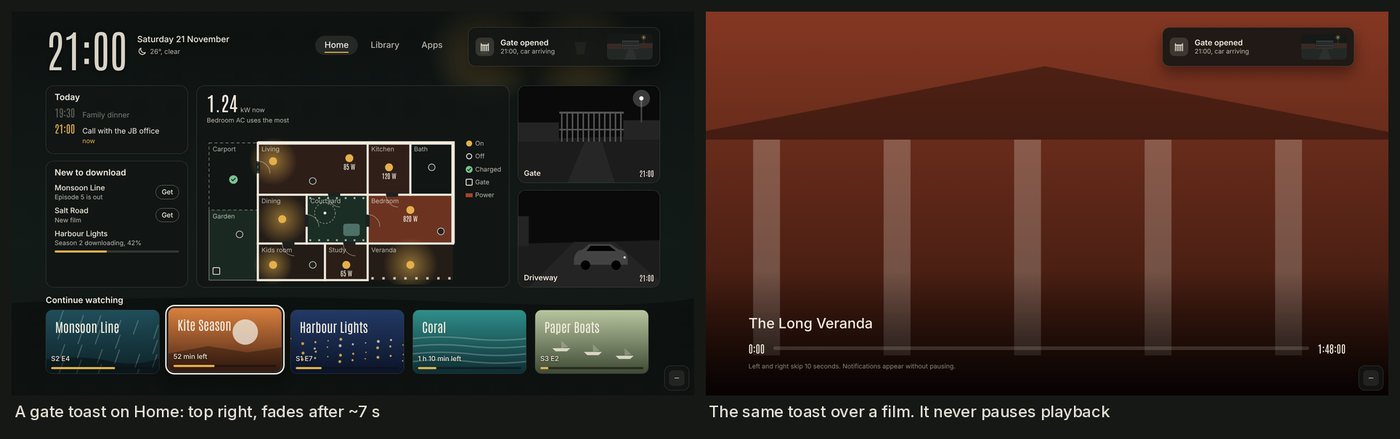
News headlines pop up too, but only when nothing is playing, at most one per interval, and never the same story twice.
The Remote Is Whatever You Have
On the CEC TV, the TV's own remote drives the shell. It took one bench finding to make this work: the TV only forwards its remote once the Pi registers as a playback device, and the Back button arrives as a MENU_REQUEST deactivate message that has to be answered "menu active" or the TV takes Back for itself. The shell also listens on the CEC bus to know when the TV is switched off. When it is, it stops the film (keeping its place), darkens the screen and drops to low power. A Pi has no suspend and CEC can't wake one that's shut down, so low power means the slowest clock with the background polling paused. It still hears CEC and the phone, and wakes the moment the TV comes back on.
For everything else there's the phone. The TV serves a small web app: a D-pad, OK/Back/Home, volume, a library browser with search, Now Playing with subtitles, settings and power. Settings › This TV shows its address as a QR code to scan. Claude added a few things I didn't ask for: a text box for searching, "Send to TV" for pasting a YouTube link, screen on/off, and a "Show me" button that flashes the TV's name on screen so you know which TV you're controlling. Power actions ask for a confirmation tap.
Power and network changes need root and the shell doesn't run as root. The shell writes the word reboot or poweroff to /run/atomtv/power. A root systemd path unit watches that file, validates the word and runs the command. No sudo, no setuid.
Media: From Jellyfin Client to Its Own Library
The plan was for the TV to be a native Jellyfin client. Halfway through, I changed my mind: I wanted the TV to be its own thing, not a front end that breaks when Jellyfin changes. The rule I gave was simple. The TV can use whatever Jellyfin has already left in the media folders (posters, thumbnails, subtitles, folder structure), but there must be no dependency on Jellyfin's API, and nothing is stored on the TV itself.
Before writing the library, Claude surveyed what was actually on the share: 446 film folders named Title (Year), each with a poster, backdrop and logo; 105 shows with episodes either loose or under Season NN; YouTube downloads under <Channel>/<yyyymmdd> - <title>.mp4; and no NFO files anywhere, because that Jellyfin setting was off. The TV mounts the share, scans it and builds the library from folder names, artwork and NFOs. When I add an API key, it fetches metadata from TMDB, subtitles from OpenSubtitles and watch history from Trakt, and writes NFOs and subtitles back into the media folders, where Jellyfin picks them up too. In the first idle hour it filled about 400 film NFOs and 90 show NFOs.
Two things went wrong on the way. Samba was mapping guest writes to nobody, and 42 folders were set to 755, so the TV's writes were refused until the share got force user = atom. And the 446-film grid pushed the shell's memory to about 550 MB on a 1 GB board. Setting MALLOC_ARENA_MAX=2 in the unit and decoding posters only near the visible part of the screen brought it down to 355–375 MB.
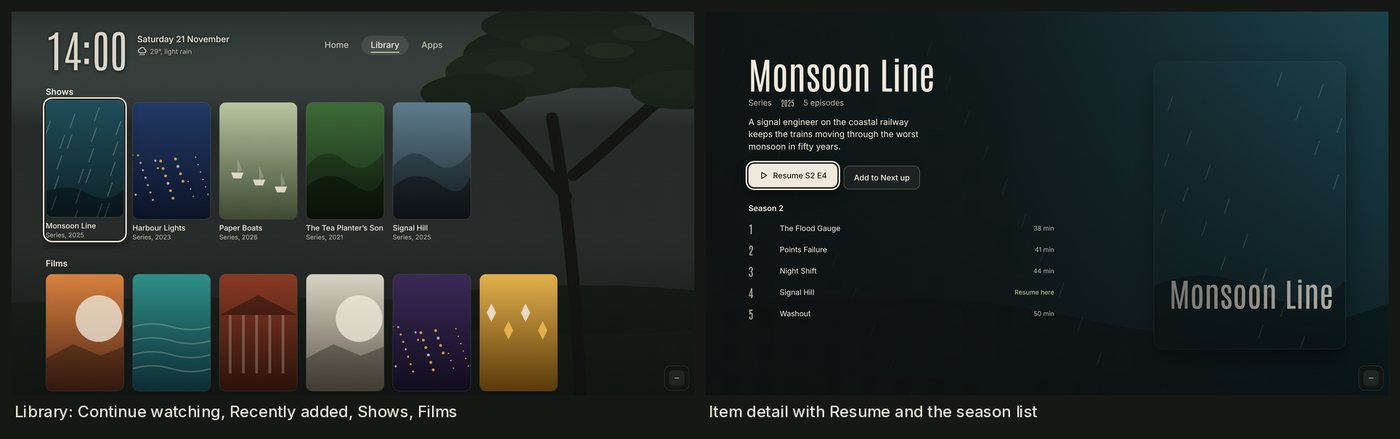
Watch state (resume points and watched flags) lives in the media share too, per account, written to a temp file and renamed so a power cut can't corrupt it. Continue watching comes from there.
Playback, and the Approach That Didn't Work
The architecture doc's first choice for video was to embed libmpv inside the Avalonia window, so toasts and the player overlay could draw directly over the video. On the Pi 3B, that spike drew about five frames a second into Avalonia's GL surface and nothing reached the screen. Claude removed the interop code, recorded why in the plan, and fell back to the second option.
Now, when a video starts, the shell hands the display to a standalone mpv. It drops DRM master on the graphics card, mpv takes the screen with its own DRM output and hardware decoding, and when playback ends the shell takes DRM master back and redraws its last frame. While mpv plays, the shell keeps running the web server, the CEC keys and the watch state, and controls mpv through its JSON IPC socket. Progress is saved every 10 seconds. At 92 % the item counts as watched.
On top of that came the things that make a TV feel like a TV rather than a video player:
Skip intro and skip credits. Tower now has a job that runs while Atom is idle, compares a season's episodes with Chromaprint and writes the intro and credit times into the share. The player also reads chapter names like "Intro" and "End credits", and drops implausible ones, such as an "intro" longer than five minutes.
Seek previews from the trickplay sheets Jellyfin already wrote beside the videos, read straight from disk.
Left −10 s, Right +30 s, OK pauses, Up and Down show the progress bar.
The Rest of the Screens
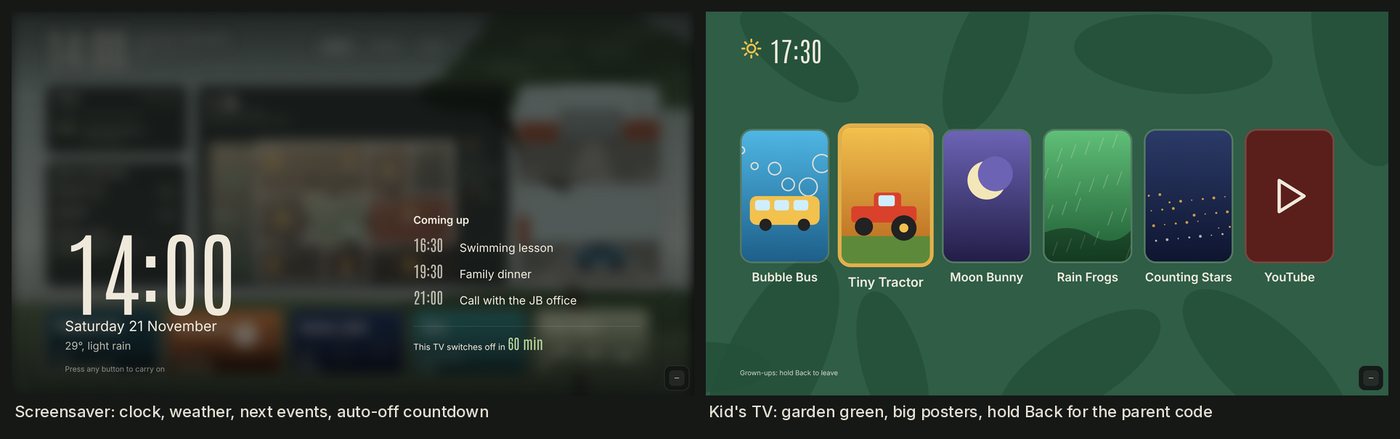
The screensaver starts after the idle time you set, never during a video. It blurs everything behind a large clock, the weather, the next three events and "This TV switches off in N min". After I asked whether it could rain on the screensaver when the forecast said rain, it now does: rain, drizzle, a storm with lightning, fog, a warm glow on a clear day and stars on a clear night. That effect cost 55–60 % of a CPU core on the Pi 3B, because it repaints the whole screen, so the light look runs it at 10 frames a second with fewer particles, and there's a switch to turn it off.
The kid's TV is a different home screen: garden green, one shelf of big posters and a YouTube tile, a thick brass focus ring, and "Nearly bedtime" in the evening. To get out of it you hold Back, or press it three times, and enter the parent code. Only critical notifications get through.
Settings covers what the TV is (role, board, remote, name on the network), the scenes and photos, the screensaver and auto-off timers, display options including HDMI colour range, and the Tower connection. Instead of scenes, the background can be a folder of photos from the network drive, picked in a proper folder browser and tinted to the time of day. Switching the board to Pi 3B turns on the light look.
How It Was Built
I've written about using Claude Code before, for this website and for Tower. This project was different in scale and in speed. Here's the timeline from the repo:
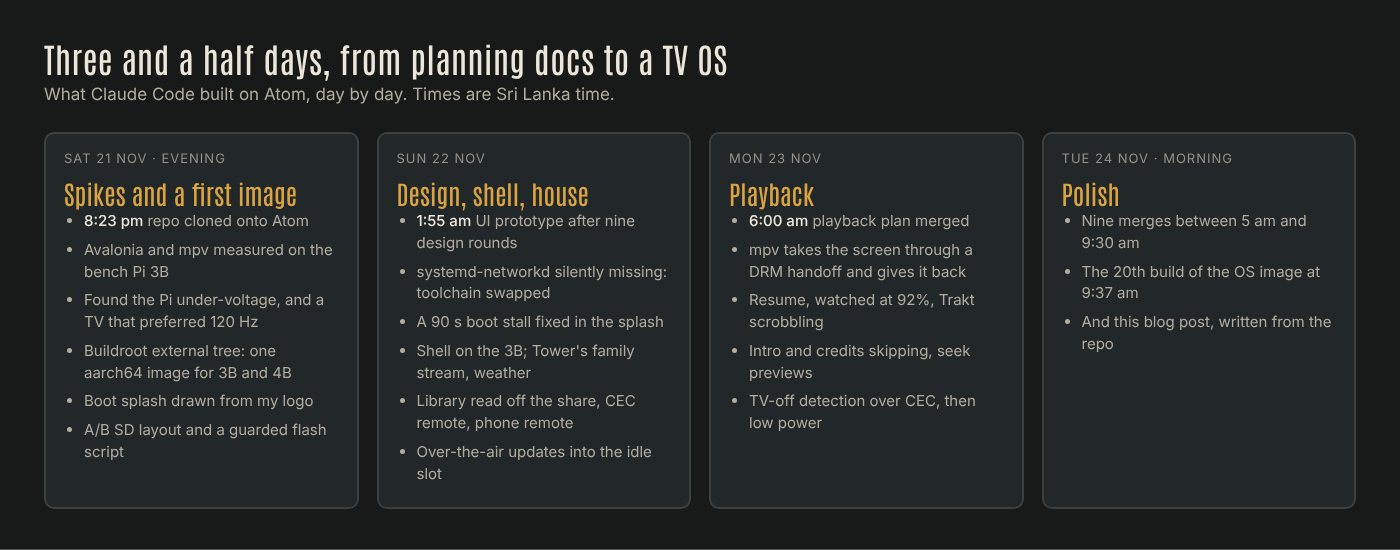
Every feature followed the same loop. I'd ask for something, often in one sentence. Claude wrote a design spec: the intent, the decisions, the options it rejected and why, and what was out of scope. Then a plan, broken into tasks with tests. Then it built, ran the tests, rendered headless screenshots of the real shell, deployed to the bench Pi over SSH, and measured: frame rate, memory, CPU, temperature. The results went into spikes/README.md and the docs, and then back to me.
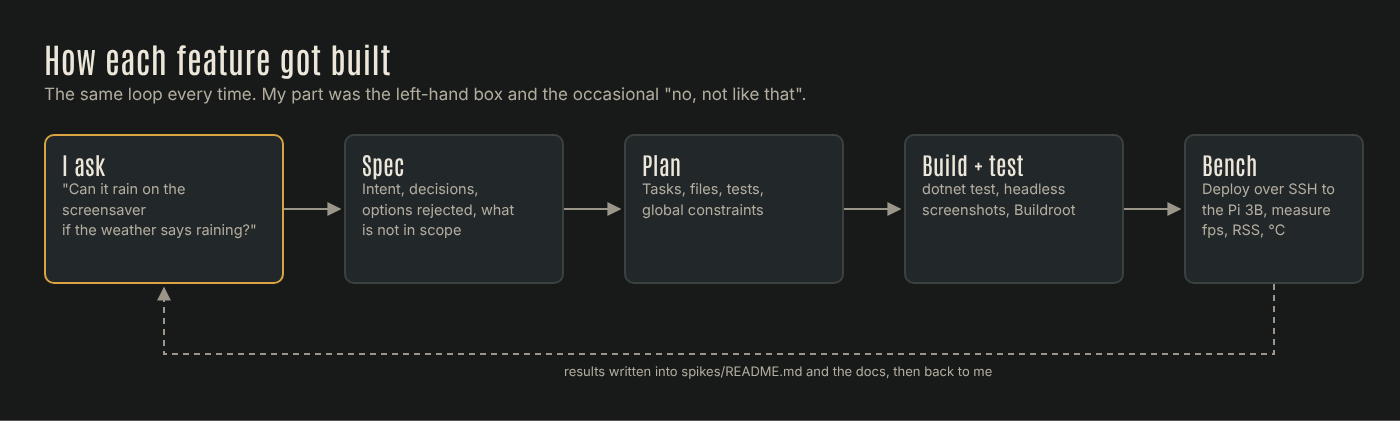
A few things stood out to me while watching it work:
It checked before it built. The Tower integration is the clearest example: the plan said "build a TV API", and Claude found that Tower already had one and impersonated a Pi instead. Same with the media survey before writing the library parser.
It measured instead of guessing. Frame rates, boot times, dropped frames, RSS and temperatures are all real numbers from the bench, including the embarrassing ones.
It wrote down why. Every spec records who decided what. Where I'd said "go ahead with your recommendations, don't wait for me", the spec says so, and where I overruled a recommendation (CCTV and downloads should go direct), the later decision is marked as superseding the earlier one.
It was careful with the dangerous bits. Flashing an SD card can wipe the wrong drive, so the flash script checks the target is a removable, unmounted USB device, waits for me to name it, and verifies the write. The update script refuses to overwrite the running slot. The build is niced so the house doesn't slow down.
It needed me for the physical world. It couldn't swap a USB cable, move an SD card between the Pi and the reader, or fit a heatsink. Most of my contribution on the bench was being its hands.
What Isn't Done Yet
It's a working OS, not a finished one. What's still open:
YouTube and the teledrama site. These need a real browser engine (WPE WebKit with Cog), which likely won't build in Atom's 3 GB of RAM. That gets its own decision.
The Pi 4. Everything so far has run on the Pi 3B on the bench. The Pi 4 should be easier (it can decode HEVC in hardware), but it hasn't been proven yet.
The non-CEC TV. It needs IR: a GPIO receiver and transmitter, a USB blaster, or one of Tower's Tuya IR devices. The design supports all three; none is wired yet.
Live camera video on the TV, rather than snapshots, depends on sharing Tower's Hikvision decryption code.
Proper A/B with automatic fallback. Today, rolling back a failed update is a manual edit. RAUC and the Pi firmware's tryboot are the next step.
A heatsink for the Pi 3B.
Conclusion
Three and a half days after the first commit, the bench Pi 3B behind a real TV boots its own Linux image in about 16 seconds, lands on a home screen that shows our house as it is right now, plays our library with resume and intro skipping, and lets the gate open in the middle of a film without stopping it. Tower sees the TV as one of its Pis, the phone is a remote, and the whole OS fits in a 768 MB root partition on a 1 GB board.
I've built media boxes before: Kodi on LibreELEC in 2020, a Raspberry Pi media box in 2023 and MediaBox 2026 this year. Each of those took weeks of evenings and ended up as someone else's software with my settings on top. This one is a custom operating system for one specific house, and I didn't write a line of it. What I did was decide what it should be, say no when it was wrong, and hold the cables. I'm still not sure how I feel about that, but the TV is very good.
Next up is the Pi 4 on my TV, and then the browser engine, so my mother's teledramas work on the new OS too.